- Home Page /
- Office Products /
- Office & School Supplies /
- Calendar Planner & Organizer Books /
- Wall Planners /
- Skylight Calendar 2 - 15-inch Full HD Touchsc...
0 ratings








Item #:
209634110
Skylight Calendar 2 - 15-inch Full HD Touchscreen Digital Calendar, Featured on Wirecutter - Wall Planner & Interactive Chore Chart, Smart Family
88% of respondents would recommend this to a friend
Item #:
209634110
MWK 999813
Price Details
Excluding Shipping & Custom charges ( Shipping and custom charges will be calculated on checkout )
*All items will import from US
In stock
 Imported from USA store
QTY:
Order now and get it around Thursday, July 02
Secured transaction
Ubuy works hard to protect your security and privacy. Our advanced payment security system ensures confidentiality by encrypting your information during transmission using AES (Advanced Encryption Standards) and SSL (Secure Socket Layer) protocols. Your payment details are 100% secure as we do not share your payment details with third party sellers.
Our Top Logistics Partners


Meet Skylight’s 15.4” touchscreen wall planner – a digital calendar and chore chart built for busy families.

Fast
Shipping

Free
Return*

Secure Packaging

100% Original Products

PCI DSS Compliance

ISO 27001 Certified


Note: Step Down Voltage Transformer required for using electronics products of US store (110-120). Recommended power converters Buy Now.


What Stands Out
Interactive Display
The Skylight Calendar features a smart touchscreen interface that allows family members to easily interact, update schedules, and manage chores effortlessly, promoting better collaboration and organization.
Large Format
With a generous 15-inch display, this wall planner provides clear visibility for all family members, ensuring everyone is informed about schedules and responsibilities at a glance.
Wall Mount Included
The included wall mount simplifies installation, allowing for versatile placement in any home. It saves space while keeping schedules organized and easily accessible for busy households.
Product Details
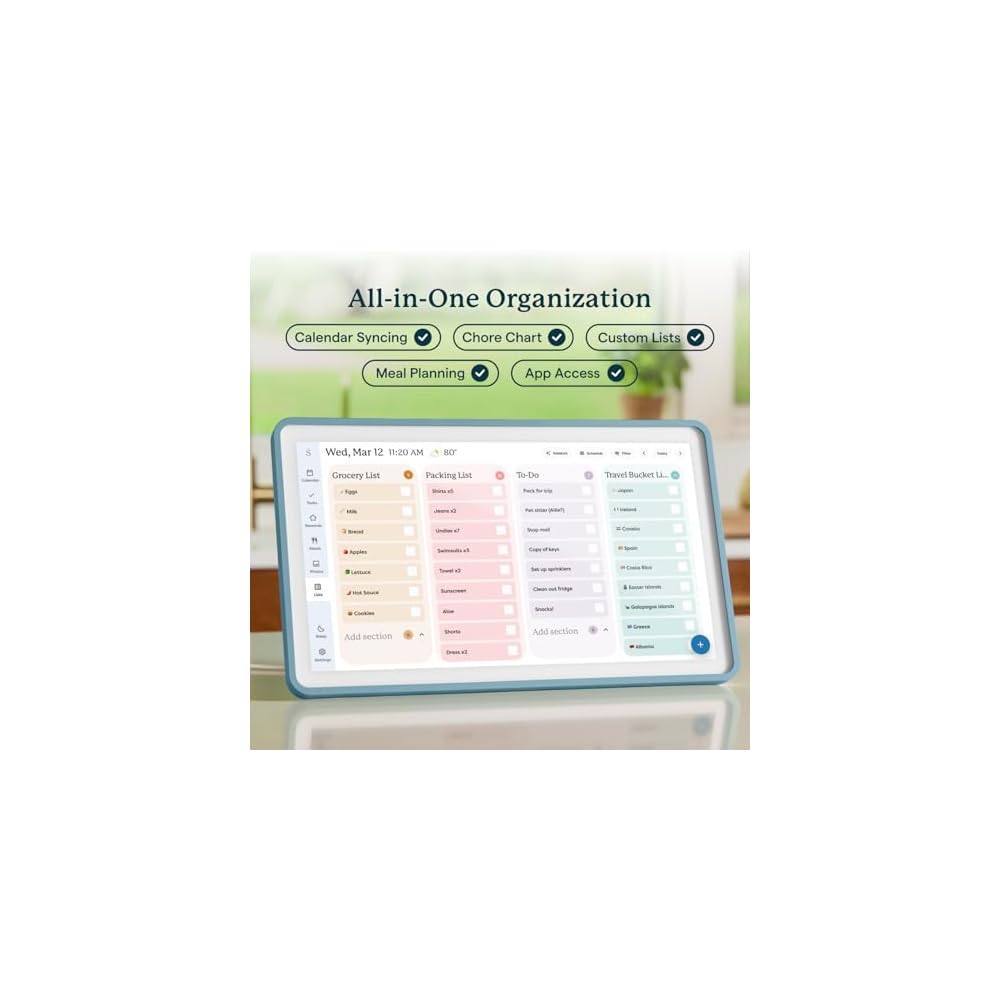
- THE ULTIMATE DIGITAL CALENDAR FEATURED ON WIRECUTTER: Meet the latest from Skylight, the Calendar 2 – includes all of the features already loved by millions of busy families, like digital calendar and chore chart, with an upgraded design and trusted by parenting experts. Featured by Wirecutter for helping families stay organized and share responsibilities. Advanced hardware and swappable Snap Frames make weekly planning look better than ever.
- EVERYTHING AT A GLANCE: The Skylight Calendar 2 features a stunning 15" Full HD display with bright and vibrant color, designed for clear visibility throughout the day. This digital wall calendar keeps schedules, chores, routines and more easy to read at a glance in busy family spaces.
- CUSTOMIZABLE DESIGN: Includes a removable magnetic Snap Frame, a 180° adjustable stand and wall mount with built-in level allowing you to personalize your digital wall calendar. Table, counter-top, or wall-mounted, our digital calendar fits perfectly in any room setup.
- EASY SETUP, SEAMLESS PERFORMANCE: Plug in, connect to Wi-Fi, and sync your calendars in minutes. With 4GB of RAM, the Skylight Calendar 2 offers smooth performance, fast syncing, and enhanced responsiveness – ideal for managing your family's busy schedule and tasks.
- STAY CONNECTED ANYWHERE: This digital family calendar includes Calendars, Tasks, and Lists for the whole family, and access to the Skylight calendar app. The optional premium Plus Plan unlocks features like Sidekick magic import, photo screensaver, meal planning, rewards, and more.
| Brand Name | Skylight |
| Manufacturer | Skylight |
| UPC | 850067427445 |
| Part Number | 152EG |
| Size | 15 Inch (38.1 cm) |
| Brand | Skylight |
| Item Weight | 3.5 lbs (1.59 kg) |
Who Should Buy?

-
Busy Families
Perfect for coordinating schedules, appointments, and chores among family members in a central electronic format.
-
Tech-Savvy Users
Ideal for individuals who appreciate interactive technology and touchscreen features for managing their calendars.
-
Home Organizers
Great for those who enjoy keeping their home organized with a visual tool for tracking chores and family events.

-
Low-Tech Users
Not suitable for individuals who prefer traditional paper calendars or are unfamiliar with digital devices.
-
Budget-Conscious Shoppers
Individuals looking for a low-cost solution may find this digital product to be more expensive than expected.
-
Small Spaces
Not ideal for those with limited wall space, as it requires a dedicated area for mounting and display.
Product Description
Have any Query? Chat with us
Customer Questions & Answers
-
Question:
What features does the Skylight Calendar offer?
Answer: The Skylight Calendar includes a 15-inch smart touchscreen display that functions as both a digital calendar and a chore chart. This interactive device allows families to easily manage their schedules, assign tasks, and view events at a glance. Additionally, you can customize reminders and display personal photos, making it not just a practical tool but also a decorative element for your wall. -
Question:
How do I set up the Skylight Calendar?
Answer: Setting up the Skylight Calendar is straightforward. Simply mount the calendar on your wall, plug it in, and connect it to Wi-Fi. You can then use the intuitive touchscreen interface to input your family’s schedules and chores. This setup process ensures that your family can start synchronizing their activities right away, enhancing your organizational efforts. -
Question:
Can multiple users access the Skylight Calendar?
Answer: Yes, multiple users can access the Skylight Calendar. You can easily share calendar access with family members, allowing everyone to add and view events or tasks. This feature is particularly useful for busy families, ensuring that all members are on the same page regarding schedules and responsibilities. -
Question:
Is the Skylight Calendar compatible with other devices?
Answer: The Skylight Calendar is designed to integrate seamlessly with devices such as smartphones and tablets. You can sync your Google Calendar or Apple Calendar, making it convenient to manage your schedules across all your devices. This connectivity ensures that you have access to your family’s plans whether you’re at home or on the go. -
Question:
How durable is the Skylight Calendar?
Answer: The Skylight Calendar is built with durable materials, designed to withstand daily use in a family environment. The touchscreen display is resistant to fingerprints and smudges, maintaining clarity and functionality over time. This durability is essential for a family planner that will see frequent interaction from multiple users. -
Question:
What customization options does the Skylight Calendar have?
Answer: The Skylight Calendar offers various customization options, including personalized color themes and the ability to upload family photos as background images. You can also adjust reminders based on individual preferences, allowing each family member to tailor their experience according to their unique scheduling needs. -
Question:
How can the Skylight Calendar help with family organization?
Answer: The Skylight Calendar is a powerful tool for enhancing family organization. By providing a centralized location for all schedules and chores, it reduces misunderstandings and overlaps. Families can use it for planning events, managing appointments, and assigning tasks, fostering a sense of teamwork and accountability among all members. -
Question:
Can I display photos on the Skylight Calendar?
Answer: Absolutely! The Skylight Calendar has a feature that allows you to display your favorite photos as part of the calendar interface. This personal touch transforms the calendar into a customizable display that adds a warm, family-oriented feel to your home, making it both functional and visually appealing. -
Question:
Is there customer support available for the Skylight Calendar?
Answer: Yes, Skylight offers customer support to assist with any queries regarding setup or functionality. Through their support team, you can access detailed guides and troubleshooting tips, ensuring that you have a smooth and enjoyable experience with your calendar, whether you’re having issues or just need help with advanced features. -
Question:
Where can I buy the Skylight Calendar in Malawi?
Answer: You can purchase the Skylight Calendar from Ubuy in Malawi. Ubuy offers a convenient shopping experience, delivering the product directly to your doorstep. You can browse their online store to explore more about the features and specifications, making it an ideal option for acquiring this family-friendly planner.
Skylight Wall Planners Editorial Review


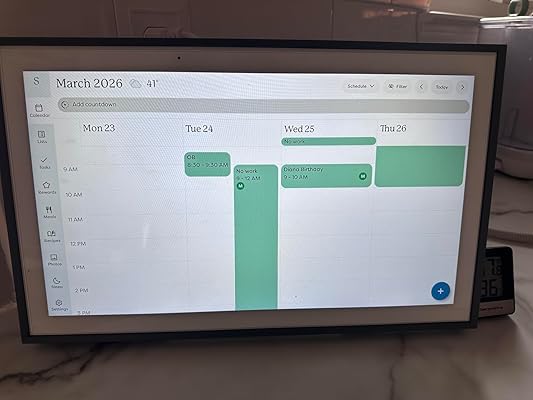
The Skylight Calendar has received overwhelmingly positive feedback as a 15-inch interactive digital wall planner that caters to busy families seeking organization and efficiency. Many users rave about the easy setup process and the sleek design, which allows it to blend seamlessly into home decor, making it a practical addition to spaces that see daily activity, such as kitchens or coffee areas. Customers commend its functionality, noting features like the Magic Import and Sidekick, as well as its ability to sync with smartphones for real-time updates and reminders. The touch screen interface has been particularly well-received, making it intuitive for family members—children included—to use. Reviewers highlight the calendar's versatility, not only serving as a scheduling tool but also functioning as a digital picture frame with slideshows, enhancing its appeal. Families appreciate the option to create different profiles, allowing various members to track their commitments and activities. The ability to scroll back through events is seen as a valuable feature for recalling past activities. However, there have been a few mixed reviews, particularly concerning initial setup difficulties for some users, especially when syncing with Android devices. A recurring point of concern is the requirement for a monthly subscription, which some users feel adds to the overall cost. Despite these concerns, the general sentiment leans towards a high satisfaction rate, as many feel the investment is justified for the time-saving convenience it provides. In summary, the Skylight Calendar has proven to be a modern, functional solution for families looking to streamline their schedules in a visually appealing and user-friendly manner. **
Customer Reviews & Ratings
6165 customers ratings
-
5 Star
79%
-
4 Star
8%
-
3 Star
4%
-
2 Star
2%
-
1 Star
7%
Review this product
Share your thoughts with other customers
Pros
- Easy setup process
- Sleek, modern design that fits various home decor
- Syncs seamlessly with smartphones
- Intuitive touchscreen interface
- Versatile: acts as both a calendar and digital picture frame
- Allows for multiple user profiles
Cons
- Requires a monthly subscription
Product Price History
Important information
- Limitations : For products shipped internationally, please note that any manufacturer warranty may not be valid; manufacturer service options may not be available; product manuals, instructions, and safety warnings may not be in destination country languages; the products (and accompanying materials) may not be designed in accordance with destination country standards, specifications, and labeling requirements; and the products may not conform to destination country voltage and other electrical standards (requiring use of an adapter or converter if appropriate). The recipient is responsible for assuring that the product can be lawfully imported to the destination country. When ordering from Ubuy or its affiliates, the recipient is the importer of record and must comply with all laws and regulations of the destination country.
- Not all the products listed on Ubuy are for sale, as Ubuy is a global search engine. Products are subject to export/trade regulations.
MWK 999813
Order now and get it around Thursday, July 02
This item is not restrict in my country.(Please click on above link if this item is not restrict in your country, So our team will review and allow.)
QTY:
Secured transaction
Ubuy works hard to protect your security and privacy. Our advanced payment security system ensures confidentiality by encrypting your information during transmission using AES (Advanced Encryption Standards) and SSL (Secure Socket Layer) protocols. Your payment details are 100% secure as we do not share your payment details with third party sellers.
Our Top Logistics Partners
Fastest cross-border delivery
Features & Benefits
- 15.4” touchscreen display for easy navigation.
- Syncs with multiple calendar platforms including Google and iCloud.
- Mountable or standalone design to fit any space.
- Includes interactive chore chart and meal planning features.
- Stay connected with family calendars, tasks, and lists.
- Optional premium plan for enhanced features and personalization.