0 ratings






Item #:
170943082
Laptop Docking Station 3 Monitors for Dell/HP/Lenovo/Mac, 15 in 1 USB C Docking Station Dual Monitor with M.2 NVMe SSD Slot, 4K@60Hz Triple Display
Item #:
170943082
MWK 188624
Price Details
Excluding Shipping & Custom charges ( Shipping and custom charges will be calculated on checkout )
*All items will import from US
23%
In stock
 Imported from USA store
QTY:
Only 10 items left in stock.
Order now and get it around Thursday, July 16
Secured transaction
Ubuy works hard to protect your security and privacy. Our advanced payment security system ensures confidentiality by encrypting your information during transmission using AES (Advanced Encryption Standards) and SSL (Secure Socket Layer) protocols. Your payment details are 100% secure as we do not share your payment details with third party sellers.
Our Top Logistics Partners


Transform your workspace with our 8-in-1 USB C Laptop Docking Station, featuring dual HDMI ports for 4K displays and lightning-fast data transfer.

Fast
Shipping

Free
Return*

Secure Packaging

100% Original Products

PCI DSS Compliance

ISO 27001 Certified


Note: Step Down Voltage Transformer required for using electronics products of US store (110-120). Recommended power converters Buy Now.


What Stands Out
Triple Display Capability
Supports up to three monitors simultaneously, providing enhanced multitasking for professionals and gamers, resulting in increased productivity and an immersive experience with stunning 4K resolution at 60Hz.
M.2 NVMe SSD Slot
Equipped with an M.2 NVMe SSD slot, allowing users to expand storage swiftly, boosting performance and faster data access without needing an additional external drive.
Universal Compatibility
Seamless integration with a wide range of devices including Dell, HP, Lenovo, and Mac, making it a versatile choice for users who switch between multiple laptops or desktops.
Product Details
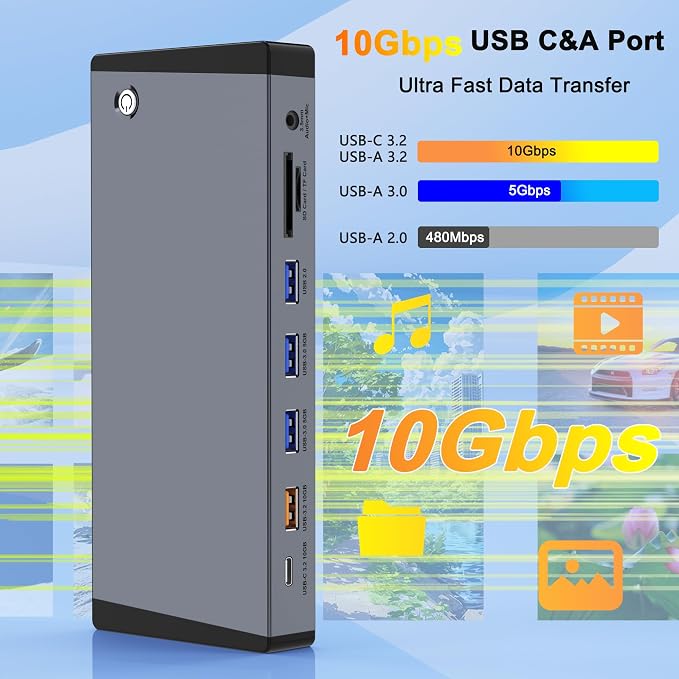
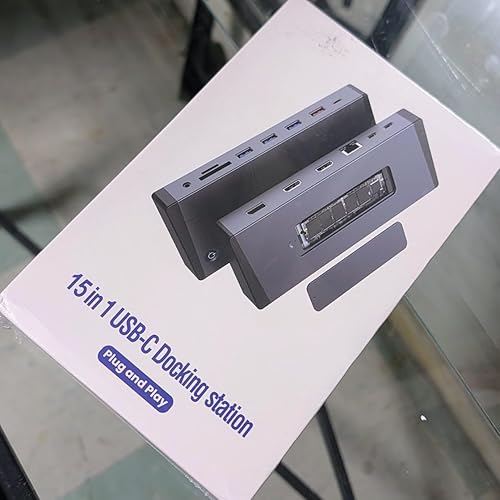
- 【Docking Station Triple Monitor】This 15-in-1 USB C docking station delivers an all-in-one triple monitor solution with: Built-in M.2 NVMe SSD enclosure (PCIe only) for instant storage expansion; Dual 4K@60Hz HDMI 2.0 + DisplayPort 1.4 for crystal-clear visuals; 10Gbps USB-C/USB-A ports (3.2 Gen2) + Gigabit Ethernet (1000Mbps); 100W Power Delivery for Thunderbolt 4 laptops; SD/TF card reader (104MB/s) + 3.5mm audio/mic jack.
- 【Professional Triple 4K Display Setup】Windows PCs: Full triple display support via MST/SST technology (3x 4K@60Hz); Mac users: Extend one 4K display + laptop screen (macOS limitation). Ideal for: Financial analysts/Video editors/Multi-tasking professionals. Requires DisplayPort Alt Mode or Thunderbolt 4 host port.
- 【100W Fast Charging + SSD Performance Boost】100W PD charging sustains power-hungry laptops like MacBook Pro 16". Dual 10Gbps USB-C/A ports (3.2 Gen2) + M.2 NVMe slot (10Gbps) for SSD upgrades - install 2242/2260/2280 drives in seconds. Pro Tip: Use the dedicated 5Gbps SD/TF card reader alongside USB 3.0 ports for simultaneous media transfers.
- 【Smart Office Features】One-touch screen control – Instantly disable multiple monitors for privacy; Gigabit Ethernet(1000Mbps) – Stable connectivity for 4K streaming/video calls; Crystal-clear audio with combined 3.5mm mic/headphone jack (supports CTIA headsets); USB 2.0 port for keyboards/security dongles.
- 【Universal Plug & Play Compatibility】Plug & Play on Windows 10/11 and macOS Ventura+. Chrome OS: Requires devices with USB4 support. Linux: Fully verified on Ubuntu 22.04 LTS (kernel 5.15). Other distributions may need driver configuration. (Note: HDMI DP function need to confirm if the usb c port of your device supports DisplayPort Alternate Mode.)
- 【Complete Package with Premium Support】Includes: 15-in-1 Thunderbolt 4 docking station/1m USB-C host cable (40Gbps)/ SSD installation toolkit (screwdriver/thermal pad)/User manual.
| Hardware Interface | Thunderbolt 4 |
| Compatible Devices | Laptop with a fully function (support charging, data transfer and video output) USB-C port or Thunderbolt 3/4 portLaptop with a fully function(support charging, data transfer and video output) |
| Total Usb Ports | 5 |
| Data Transfer Rate | 10 Gigabits Per Second |
| Number of Ports | 15 |
| Minimum Required Operating System Version | Windows 10 |
| Operating System | Windows 10/11, macOS, Linux |
| Color | Gray |
| Item Dimensions L x W x H | 6.89"L x 3.11"W x 0.83"H (17.5 x 7.9 x 2.1 cm) |
| Item Weight | 0.49 Pounds (220 grams) |
| Brand | Aibilangose |
| Manufacturer | Aibilangose |
| Mfr Part Number | ALG-15 |
| Model Number | ALG-15 |
| Compatible Devices | Laptop with a fully function (support charging, data transfer and video output) USB-C port or Thunderbolt 3/4 portLaptop with a fully function(support charging, data transfer and video output) See more |
| Total USB Ports | 5 |
Who Should Buy?

-
Multimedia Professionals
Ideal for graphic designers and video editors requiring multiple displays for enhanced workflow and high-resolution output.
-
Remote Workers
Perfect for those working from home who need a variety of connectivity options and multiple screens for productivity.
-
Tech Enthusiasts
Great choice for users looking to expand their connectivity and screen capabilities with a comprehensive docking solution.

-
Casual Users
Not ideal for users who only need basic connections and do not utilize multiple screens regularly.
-
Budget-Conscious Users
Could be too expensive for individuals who need minimal features and lack the budget for advanced technology.
-
Older Devices
May not be compatible with older laptops lacking USB-C ports or advanced functionality.
Product Description
Have any Query? Chat with us
Customer Questions & Answers
-
Question:
What is a Dual HDMI Adapter for 2 Monitors?
Answer: A Dual HDMI Adapter for 2 Monitors is a device that allows you to connect two HDMI-compatible displays to a single laptop or computer using a USB-C port. This adapter can support high-definition video and audio output at resolutions up to 4K at 60Hz, making it ideal for users who need additional screen space for multitasking. Whether you’re a gamer wanting to immerse yourself in multiple displays or a professional requiring more room for spreadsheets and documents, this adapter provides a simple solution for dual monitor setups. -
Question:
How does a laptop docking station with dual monitor support work?
Answer: A laptop docking station with dual monitor support functions by connecting the dock to your laptop via USB-C. Once connected, the docking station allows you to connect up to two HDMI monitors, effectively expanding your display capabilities. The dual monitor setup helps in managing multiple applications simultaneously, enhancing productivity for work tasks or providing an immersive gaming experience. By using this docking station, you can enjoy a clutter-free workspace with all your peripherals plugged in at once. -
Question:
What are the benefits of using a 4K@60Hz dual monitor adapter?
Answer: Using a 4K@60Hz dual monitor adapter provides several benefits including crystal clear picture quality and smoother motion for video playback and gaming. The high refresh rate ensures that fast-paced action looks fluid and lifelike. Additionally, the ability to run multiple monitors enhances productivity by allowing users to drag and drop between screens, organize their workspace more efficiently, or enjoy an extended view for presentations. This is especially beneficial for graphic designers, editors, and professionals who require precision in visual tasks. -
Question:
Is an HDMI splitter the same as a dual HDMI adapter?
Answer: No, an HDMI splitter and a dual HDMI adapter serve different purposes. An HDMI splitter duplicates a single HDMI output signal to multiple displays, showing the same content on each screen. In contrast, a dual HDMI adapter connects two monitors to a laptop, allowing separate content to be displayed on each screen. This distinction is crucial when setting up a workspace, as users seeking a multitasking setup should opt for a dual HDMI adapter to utilize the full potential of their monitors. -
Question:
What operating systems are compatible with this HDMI docking station?
Answer: Most dual HDMI docking stations are compatible with a variety of operating systems, including Windows, macOS, and certain distributions of Linux. Compatibility may depend on the specific model and driver support, but generally, users can expect seamless performance across major platforms. This makes it easy for professionals and casual users alike to set up dual monitor systems regardless of their device's operating system, ensuring flexible usage for work, gaming, or entertainment needs. -
Question:
Can I use this dual monitor adapter with my gaming console?
Answer: Typically, dual monitor adapters are designed predominantly for laptops and computers. If your gaming console features USB-C output and supports display port functionalities, you might be able to use the adapter. However, most consoles utilize HDMI outputs directly. For gamers, it’s essential to check compatibility with their specific console model to ensure the adapter can facilitate dual display, as this is primarily aimed at enhancing setups for productivity or business rather than gaming. -
Question:
What cables do I need to connect my monitors to the dual HDMI adapter?
Answer: To connect your monitors to a dual HDMI adapter, you will need two HDMI cables, as the adapter comes with the necessary USB-C connection to your laptop or device. Typically, the monitors will have HDMI ports, so a standard HDMI cable will work. Ensure that the cables are rated for high-speed performance to achieve the best video quality, especially when working with resolutions up to 4K@60Hz. This setup is perfect for both professional environments and entertainment systems, ensuring you get the best visual experience. -
Question:
What should I do if my dual monitor setup isn't working?
Answer: If your dual monitor setup isn’t working, first check all connections to ensure that the HDMI cables are securely plugged into both the adapter and the monitors. Next, verify that your display settings on the laptop or computer are configured to use the extended display mode. Sometimes, updating drivers can resolve connectivity issues. If the problem persists, consult the user manual or troubleshooting guide for specific steps based on your operating system or device type. Taking these steps can usually resolve common issues quickly. -
Question:
How can I use the dual HDMI adapter for presentations?
Answer: Using a dual HDMI adapter for presentations can greatly enhance your display setup. You can connect one monitor to display your presentation slides while using the other monitor to show notes or supplementary materials. This arrangement allows for smoother transitions and helps maintain your audience's focus on the visuals. Connect your laptop to the adapter using USB-C, then link each monitor with HDMI cables. This setup is ideal for educators, trainers, or business professionals looking to deliver effective presentations. -
Question:
Where can I buy the Dual HDMI Adapter for 2 Monitors?
Answer: You can buy the Dual HDMI Adapter for 2 Monitors at Ubuy in Malawi. Ubuy offers a wide selection of electronic accessories, and their convenient online shopping platform allows users to choose the best options for their needs. By purchasing through Ubuy, you can enjoy hassle-free shopping and fast delivery, making it easy to get your dual monitor setup up and running with minimal delay.
Aibilangose Docking Stations ALG-15 Editorial Review




No editorial reviews found
Customer Reviews & Ratings
9 customers ratings
-
5 Star
40%
-
4 Star
12%
-
3 Star
26%
-
2 Star
22%
-
1 Star
0%
Review this product
Share your thoughts with other customers
Platform Trust & Buyer Confidence

MT
Mohd
Verified buyer
“The product received very good packaging & safe…Thank You”
16 June 2026 · via Trustpilot
SJ
Shawati
Verified buyer
“Accurate delivery timing given”
16 June 2026 · via Trustpilot
YB
Youcef
Verified buyer
“Not madly expensive like I thought, and much quicker than promised.”
15 June 2026 · via Trustpilot
LM
Leila
Verified buyer
“Never dealt with Ubuy before, but everything worked out great. Seamless cross border purchasing and shipping. Thanks!”
6/7/2026 · via Trustpilot
KA
Kwame
Verified buyer
“The process was smooth, with clear communication and timelines. This was my 1st purchase and I am really impressed. I will definitely be coming back.”
12 June 2026 · via Trustpilot
Secure Checkout
Global Delivery
Easy Returns
Genuine Products
Product Price History
Important information
- Limitations : For products shipped internationally, please note that any manufacturer warranty may not be valid; manufacturer service options may not be available; product manuals, instructions, and safety warnings may not be in destination country languages; the products (and accompanying materials) may not be designed in accordance with destination country standards, specifications, and labeling requirements; and the products may not conform to destination country voltage and other electrical standards (requiring use of an adapter or converter if appropriate). The recipient is responsible for assuring that the product can be lawfully imported to the destination country. When ordering from Ubuy or its affiliates, the recipient is the importer of record and must comply with all laws and regulations of the destination country.
- Not all the products listed on Ubuy are for sale, as Ubuy is a global search engine. Products are subject to export/trade regulations.
MWK 188624
Order now and get it around Thursday, July 16
This item is not restrict in my country.(Please click on above link if this item is not restrict in your country, So our team will review and allow.)
QTY:
Only 10 items left in stock.
Secured transaction
PCI DSS compliant and ISO 27001:2022 certified, with encrypted payments and full buyer protection on every order.
Our Top Logistics Partners
Fastest cross-border delivery
Features & Benefits
- Transform your workspace with an 8-in-1 USB C docking station.
- Connect two 4K monitors simultaneously with dual HDMI ports.
- Experience hassle-free plug-and-play setup; no drivers needed.
- Enjoy high-speed data transfer of up to 5Gbps via USB 3.0.
- Power devices quickly with 100W PD charging capability.
- Compatible with a wide range of laptops including Dell, HP, Lenovo, and Mac.
Ubuy Assurance
Experience worry-free shopping with 100% original products, PCI DSS-compliant payment security, ISO 27001-certified data protection, the fastest cross-border delivery, free returns *, and secure packaging on every order.