- Home Page /
- Electronics /
- Computer Accessories /
- Computer Accessories & Peripherals /
- Computer Hard Drive Accessories /
- Docking Stations /
- ORICO M.2 NVMe Docking Station Dual-Bay SSD C...
0 ratings

Item #:
110068050
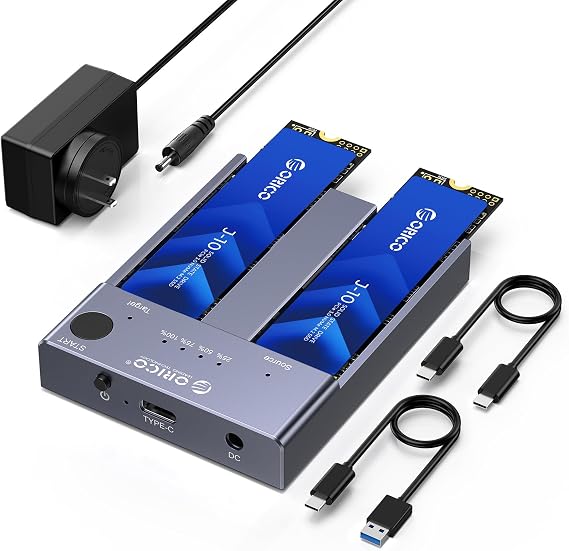
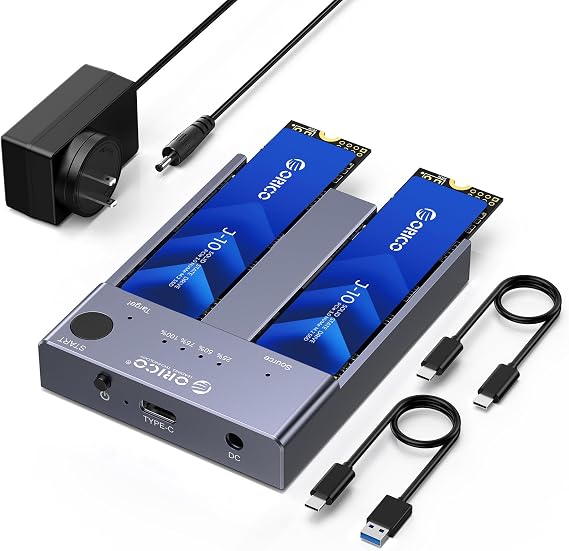
ORICO M.2 NVMe Docking Station Dual-Bay SSD Cloner USB A/C to NVMe SSD Enclosure Aluminum M.2 Duplicator for PCIe M-Key SSDs Max Up to 8TB Tool
88% of respondents would recommend this to a friend
Item #:
110068050
MWK 338583
Price Details
Excluding Shipping & Custom charges ( Shipping and custom charges will be calculated on checkout )
*All items will import from US
0 ratings
Write a review
In stock
 Imported from USA store
QTY:
Order now and get it around Saturday, September 26
Secured transaction
Ubuy works hard to protect your security and privacy. Our advanced payment security system ensures confidentiality by encrypting your information during transmission using AES (Advanced Encryption Standards) and SSL (Secure Socket Layer) protocols. Your payment details are 100% secure as we do not share your payment details with third party sellers.
Our Top Logistics Partners


Support one-key offline clone can directly transfer the data from Disk 1 to Disk 2 without going through the computer.

Fast
Shipping

Free
Return*

Secure Packaging

100% Original Products

PCI DSS Compliance

ISO 27001 Certified



Note: Step Down Voltage Transformer required for using electronics products of US store (110-120). Recommended power converters Buy Now.


What Stands Out
Dual-Bay Cloning
Seamlessly clone two M.2 NVMe SSDs simultaneously without a computer, saving time on data transfers and duplications.
Tool-Free Design
Easily install or replace M.2 NVMe SSDs without any tools, providing convenience and efficiency for users who regularly upgrade storage.
High Capacity Support
Accommodates NVMe SSDs up to 8TB, enabling extensive data storage for professionals and enthusiasts needing significant capacity for their projects.
Product Details
| Hardware Interface | USB 3.2 Gen 2 |
| Hardware Platform | Universal |
| Memory Storage Capacity | 8 TB |
| Compatible Devices | Gaming Console, Laptop, Personal Computer, Tablet, Television |
| Hard Disk Form Factor | 22 millimeters |
| Supported Devices Quantity | 2 |
| Data Transfer Rate | 10 gigabits_per_second |
| Connectivity Technology | USB |
| Color | Cool Gray |
| Enclosure Material | Metal |
| Brand | ORICO |
| Unit Count | 2 Count |
| Number of Packs | 1 |
| Manufacturer | SHENZHEN ORICO TECHNOLOGIES CO.,LTD |
| Built-In Media | 5V/4A Power Adapter, C to A Data Cable, C to C Data Cable, M.2 NVMe Cloner |
| Model Number | M2P2-C3 |
| Mfr Part Number | M2P2-US |
| Material | Metal |
| Item Weight | 0.88 lbs (400 grams) |
Who Should Buy?

-
Data Recovery Professionals
Ideal for experts needing quick access to multiple NVMe SSDs for data recovery and cloning tasks efficiently.
-
Tech Enthusiasts
Perfect for hobbyists who frequently upgrade and manage SSDs, allowing tool-free swapping and cloning capabilities.
-
Small Business Owners
Great for businesses that require backups and data duplication for client drives in a fast and reliable manner.

-
Casual Users
Home users who rarely interact with SSDs may find this product overly complicated and unnecessary for their needs.
Product Description
ORICO M.2 NVMe Docking Station Dual-Bay SSD Cloner USB A/C to NVMe SSD Enclosure Aluminum M.2 Duplicator for PCIe M-Key SSDs Max Up to 8TB Tool Free-M2P2
Have any Query? Chat with us
Customer Questions & Answers
-
Question:
What makes the ORICO M.2 NVMe Docking Station a great choice for SSD cloning?
Answer: The ORICO M.2 NVMe Docking Station stands out for its dual-bay design, allowing users to clone SSDs without the need for a computer. It supports PCIe M-Key SSDs and can handle drives up to 8TB. This is ideal for professionals or tech enthusiasts who frequently need to duplicate data or upgrade storage. Whether you're looking to create backup drives or transfer large amounts of data, the ORICO Docking Station simplifies the process, making it a valuable tool in any tech toolkit. -
Question:
How does the dual-bay feature of the ORICO Docking Station work?
Answer: The dual-bay feature allows for simultaneous access to two M.2 NVMe SSDs, enabling straightforward cloning or data transfer between them. Users can insert one SSD as a source drive while the other serves as the target. This functionality is particularly beneficial for those needing to frequently back up important data or replace older SSDs without using a computer. It's perfect for scenarios like upgrading a laptop's storage or creating a clone of a working drive quickly and efficiently. -
Question:
What types of SSDs can be used with the ORICO M.2 NVMe Docking Station?
Answer: This docking station is designed specifically for PCIe M-Key NVMe SSDs. Users should ensure their SSDs meet this specification for optimal performance. The versatility to support SSDs up to 8TB means that users can work with both standard and high-capacity drives. This is particularly useful for creative professionals or gamers who work with large files and require robust storage solutions. -
Question:
Is the ORICO Docking Station compatible with USB-C devices?
Answer: The ORICO M.2 NVMe Docking Station connects via USB 3.1, which is backward compatible with USB-C ports. While the docking station itself uses a USB-A interface, you can utilize a USB-C to USB-A adapter to connect to devices with USB-C ports. This flexibility enhances usability across a range of devices including laptops and desktops, making it a great addition to your tech collection. -
Question:
What benefits does the aluminum construction of the ORICO Docking Station offer?
Answer: The aluminum construction provides excellent heat dissipation, keeping SSDs cool during operation and prolonging their lifespan. Additionally, aluminum is durable and offers a sleek, professional look. This makes it not only a functional tool but also an aesthetically pleasing addition to your workspace. Moreover, its sturdy build ensures that the docking station can withstand regular use while protecting your valuable drives. -
Question:
Can I use the ORICO Docking Station for data recovery purposes?
Answer: Yes, the ORICO M.2 NVMe Docking Station can be advantageous for data recovery. If you have a failed SSD, you can use the dock to connect it to a working computer and attempt to retrieve data from it. This is particularly useful for users who have valuable data on their SSD that might be inaccessible. It's a handy tool for both casual users and IT professionals dealing with data recovery tasks. -
Question:
What is the maximum speed I can expect from the ORICO M.2 NVMe Docking Station?
Answer: With its USB 3.1 interface, the ORICO M.2 NVMe Docking Station can reach speeds of up to 10Gbps, depending on the specifications of the connected SSD. This high-speed capability significantly reduces the time required for data transfers and cloning. For users handling large files, multimedia content, or extensive backups, these speeds can greatly enhance productivity and efficiency. -
Question:
What are the power requirements for using the ORICO M.2 NVMe Docking Station?
Answer: The ORICO Docking Station uses USB to provide power, which simplifies its operation. There is no need for an external power adapter, making it convenient for travel and setup. This is especially beneficial for users who frequently move between different workspaces or need a portable storage solution. Simply plug it into a USB port, and you're ready to go. -
Question:
What should I do if my SSD is not recognized by the ORICO Docking Station?
Answer: If your SSD is not recognized, first ensure it is properly seated in the docking station. Check the compatibility of the SSD type and ensure it’s a PCIe M-Key NVMe drive. Additionally, confirm that your USB connection is secure and functioning. If issues persist, testing the SSD on another device can help determine if the dock or the SSD is at fault. Troubleshooting these basic issues often resolves recognition problems. -
Question:
Where can I buy the ORICO M.2 NVMe Docking Station?
Answer: You can purchase the ORICO M.2 NVMe Docking Station from Ubuy in Malawi. Ubuy offers a reliable platform with a selection of high-quality tech products, ensuring you have access to the latest in storage solutions. Visiting Ubuy allows you to browse product specifications, compare features, and find the best fit for your needs seamlessly.
ORICO Docking Stations M2P2-C3 Editorial Review
No editorial reviews found
Customer Reviews & Ratings
1 customers ratings
-
5 Star
100%
-
4 Star
0%
-
3 Star
0%
-
2 Star
0%
-
1 Star
0%
Review this product
Share your thoughts with other customers
Pros
- Fast data transfer speeds
- Supports offline cloning
- Compatible with PCIe M-Key SSDs
- Robust aluminum construction
- Easy to use setup
Cons
- Limited to M-Key SSDs
Platform Trust & Buyer Confidence

JK
Jasmin
Verified buyer
“Great products and very good service: very easy and very fast international delivery.”
9 September 2026 · via Trustpilot
AG
Anke
Verified buyer
“Wonderful online shopping experience, smooth transaction from the start. Payment method works conveniently and delivery is unexpectedly fast and reliable. You go the extra mile for service. What makes this even more amazing, you deliver to Namibia. I will remain a happy Ubuy customer and will increase my purchases for sure! Thank you!”
10 September 2026 · via Trustpilot
H
Hazel
Verified buyer
“Very easy to find the products what you need, and so fast delivery, that’s why I highly recommended to others costumers to used ubuy.”
10 September 2026 · via Trustpilot
O
Opaleye
Verified buyer
“I received exactly what I ordered I was skeptical about your site because that was my first time to order. But the order came timely and neatly packaged. I was not disappointed. Thank you.”
11 September 2026 · via Trustpilot
AC
Adele
Verified buyer
“Easy to find and order what you want on the website. Delivery is quick to the UK”
8 September 2026 · via Trustpilot
Secure Checkout
Global Delivery
Easy Returns
Genuine Products
Product Price History
Important information
- Limitations : For products shipped internationally, please note that any manufacturer warranty may not be valid; manufacturer service options may not be available; product manuals, instructions, and safety warnings may not be in destination country languages; the products (and accompanying materials) may not be designed in accordance with destination country standards, specifications, and labeling requirements; and the products may not conform to destination country voltage and other electrical standards (requiring use of an adapter or converter if appropriate). The recipient is responsible for assuring that the product can be lawfully imported to the destination country. When ordering from Ubuy or its affiliates, the recipient is the importer of record and must comply with all laws and regulations of the destination country.
- Not all the products listed on Ubuy are for sale, as Ubuy is a global search engine. Products are subject to export/trade regulations.
MWK 338583
Order now and get it around Saturday, September 26
This item is not restrict in my country.(Please click on above link if this item is not restrict in your country, So our team will review and allow.)
QTY:
Secured transaction
PCI DSS compliant and ISO 27001:2022 certified, with encrypted payments and full buyer protection on every order.
Our Top Logistics Partners
Fastest cross-border delivery
Features & Benefits
- Achieve data transfer with a one-key offline cloning feature.
- Experience lightning-fast data transmission rates up to 10Gbps.
- Easily manage and operate two SSDs simultaneously with plug & play support.
- Constructed with durable aluminum alloy for effective heat dissipation.
- Compatible with various operating systems: Windows, macOS, and Linux.
- Maximize storage capacity with support for up to 8TB of SSDs.
Ubuy Assurance
Experience worry-free shopping with 100% original products, PCI DSS-compliant payment security, ISO 27001-certified data protection, the fastest cross-border delivery, free returns *, and secure packaging on every order.