- Home Page /
- Electronics /
- Computer Accessories /
- Computer Accessories & Peripherals /
- Computer Cable Adapters /
- USB-to-VGA Adapters /
- USB C to HDMI VGA Adapter,USB Type C to VGA H...
0 ratings

Item #:
120661834
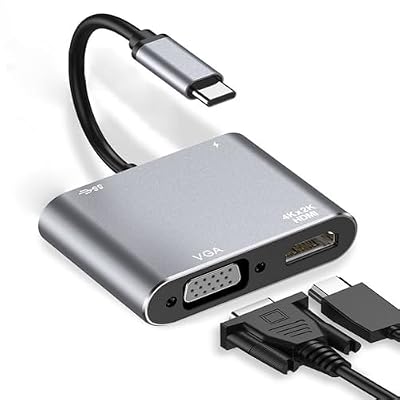
USB C to HDMI VGA Adapter,USB Type C to VGA HDMI Thunderbolt 3 VGA Adapter for MacBook ProiPad ProAir 2020 2019 2018,Dell XPS 1315,Surface Pro,
Item #:
120661834
MWK 46322
Price Details
Excluding Shipping & Custom charges ( Shipping and custom charges will be calculated on checkout )
*All items will import from US
0 ratings
Write a review
In stock
 Imported from USA store
QTY:
Order now and get it around Wednesday, July 15
Secured transaction
Ubuy works hard to protect your security and privacy. Our advanced payment security system ensures confidentiality by encrypting your information during transmission using AES (Advanced Encryption Standards) and SSL (Secure Socket Layer) protocols. Your payment details are 100% secure as we do not share your payment details with third party sellers.
Our Top Logistics Partners


Enjoy vivid images, true to life at working or for home entertainment.

Fast
Shipping

Free
Return*

Secure Packaging

100% Original Products

PCI DSS Compliance

ISO 27001 Certified


Note: Step Down Voltage Transformer required for using electronics products of US store (110-120). Recommended power converters Buy Now.


What Stands Out
Versatile Compatibility
This adapter supports multiple devices including MacBook, Dell XPS, and Surface Pro, making it ideal for users with varied electronics for seamless connectivity.
Dual Output Support
Easily connect to both HDMI and VGA displays simultaneously. Perfect for presentations and multitasking, enhancing productivity with expanded display options.
High-Quality Output
Experience crisp video and audio quality, ensuring clear and vibrant presentations. Superior materials guarantee durability and performance over time.
Product Details
| Item Weight | 0.4 lbs (180 grams) |
Who Should Buy?

-
Multimedia Users
Ideal for users who need to connect laptops to projectors or monitors for presentations and streaming videos.
-
Flexibility Seekers
Great for those who use multiple devices with different display ports, offering versatility in connections.
-
Travel Enthusiasts
Compact design makes it convenient for on-the-go users who need to connect to displays during travel.

-
High-Resolution Gamers
Not suitable for users needing high refresh rates and resolutions for gaming due to limited output capabilities.
-
Older Device Users
Individuals with older hardware lacking USB-C ports will find this adapter incompatible with their systems.
-
Power Users
Not ideal for professionals requiring advanced video features such as 4K output or support for multiple displays.
Product Description
USB C to HDMI VGA Adapter,USB Type C to VGA HDMI Thunderbolt 3 VGA Adapter for MacBook ProiPad ProAir 2020 2019 2018,Dell XPS 1315,Surface Pro, Galaxy S8S9, Huawei P20
Have any Query? Chat with us
Customer Questions & Answers
-
Question:
What devices are compatible with the USB C to HDMI VGA Adapter?
Answer: The USB C to HDMI VGA Adapter is designed for a variety of devices including Macs, specifically the MacBook Pro and MacBook Air (2018 and later), the iPad Pro models, Dell XPS 13/15, Surface Pro, Galaxy S8/S9, and Huawei P20. This versatility ensures you can connect your USB-C or Thunderbolt 3 devices to external displays. For instance, if you're giving a presentation using a MacBook Pro, this adapter allows you to easily connect to an HDMI projector or VGA monitor, facilitating seamless transitions between devices. -
Question:
Can I use both HDMI and VGA simultaneously with this adapter?
Answer: No, the USB C to HDMI VGA Adapter does not support simultaneous output to both HDMI and VGA. You can only use one output at a time. This design is to ensure that the signal is routed efficiently to either an HDMI display or a VGA monitor based on your needs. A practical scenario would be if you're switching between using a modern television with HDMI and an older projector with VGA for different presentations. -
Question:
What resolutions are supported by the USB C to HDMI VGA Adapter?
Answer: The USB C to HDMI VGA Adapter supports resolutions up to 4K at 30Hz through the HDMI port and 1080p at 60Hz from the VGA port. This high-resolution capability allows for crystal-clear visuals, making it ideal for high-definition movies, games, and professional presentations. For example, using a 4K monitor with this adapter can significantly enhance the viewing experience during graphic design tasks or video editing. -
Question:
Is this adapter plug-and-play compatible?
Answer: Yes, the USB C to HDMI VGA Adapter is plug-and-play compatible, requiring no additional drivers or software for installation. Simply connect the adapter to your device and the display. This ease of use makes it particularly beneficial for users who need to quickly switch connectivity without technical hassles, such as teachers setting up projectors in classrooms on short notice. -
Question:
Does the adapter support audio output?
Answer: Yes, when connected via HDMI, the USB C to HDMI VGA Adapter supports audio output, allowing you to transmit sound alongside the video signal. This feature is great for multimedia presentations or watching movies, as it delivers both high-quality visuals and sound. For instance, connecting your MacBook Pro to a TV with this adapter lets you enjoy movies with full audio, enhancing your entertainment experience. -
Question:
What should I do if the adapter is not recognized by my device?
Answer: If your USB C to HDMI VGA Adapter is not recognized, first ensure it is securely connected to both your device and the display. Try using a different USB-C port on your device, as some ports may have limited functionality. Additionally, check that your display is powered on and set to the correct input source. If problems persist, restarting your device can often resolve temporary glitches, allowing for smooth operation. -
Question:
Can I use this adapter with gaming consoles?
Answer: The USB C to HDMI VGA Adapter is primarily designed for laptops and tablets with USB-C ports, so using it with gaming consoles like Xbox or PlayStation is not feasible as these typically require HDMI input directly. However, if you have a portable monitor with USB-C support, it could facilitate a unique gaming setup. It's best suited for devices like a MacBook Pro for seamless screen mirroring or extension. -
Question:
What cable lengths does this adapter come with?
Answer: The USB C to HDMI VGA Adapter typically comes with a compact and lightweight design, making it easy to carry around for mobile setups. The standard length is designed for convenience, allowing flexibility in connecting to various display devices without excessive cable clutter. This portability is ideal for professionals who travel frequently for meetings or presentations, ensuring you can connect your device wherever needed. -
Question:
How do I switch between HDMI and VGA output?
Answer: Switching between HDMI and VGA output with your USB C to HDMI VGA Adapter simply involves disconnecting one cable and connecting the other. It's a straightforward process: first, unplug the HDMI or VGA cable from the adapter, then plug in the one you wish to use. This flexibility allows you to choose the best output option based on the display you are working with, whether in a conference room or classroom. -
Question:
Where can I buy a USB C to HDMI VGA Adapter?
Answer: You can buy the USB C to HDMI VGA Adapter from Ubuy in Malawi. Ubuy provides a simple purchasing process and a variety of options to suit your needs, ensuring you get a quality adapter that meets your device compatibility and display requirements.
DUOYHIEL USB-to-VGA Adapters Editorial Review
No editorial reviews found
Customer Reviews & Ratings
1 customers ratings
-
5 Star
100%
-
4 Star
0%
-
3 Star
0%
-
2 Star
0%
-
1 Star
0%
Review this product
Share your thoughts with other customers
Platform Trust & Buyer Confidence

MT
Mohd
Verified buyer
“The product received very good packaging & safe…Thank You”
16 June 2026 · via Trustpilot
SJ
Shawati
Verified buyer
“Accurate delivery timing given”
16 June 2026 · via Trustpilot
YB
Youcef
Verified buyer
“Not madly expensive like I thought, and much quicker than promised.”
15 June 2026 · via Trustpilot
LM
Leila
Verified buyer
“Never dealt with Ubuy before, but everything worked out great. Seamless cross border purchasing and shipping. Thanks!”
6/7/2026 · via Trustpilot
KA
Kwame
Verified buyer
“The process was smooth, with clear communication and timelines. This was my 1st purchase and I am really impressed. I will definitely be coming back.”
12 June 2026 · via Trustpilot
Secure Checkout
Global Delivery
Easy Returns
Genuine Products
Product Price History
Important information
- Limitations : For products shipped internationally, please note that any manufacturer warranty may not be valid; manufacturer service options may not be available; product manuals, instructions, and safety warnings may not be in destination country languages; the products (and accompanying materials) may not be designed in accordance with destination country standards, specifications, and labeling requirements; and the products may not conform to destination country voltage and other electrical standards (requiring use of an adapter or converter if appropriate). The recipient is responsible for assuring that the product can be lawfully imported to the destination country. When ordering from Ubuy or its affiliates, the recipient is the importer of record and must comply with all laws and regulations of the destination country.
- Not all the products listed on Ubuy are for sale, as Ubuy is a global search engine. Products are subject to export/trade regulations.
MWK 46322
Order now and get it around Wednesday, July 15
This item is not restrict in my country.(Please click on above link if this item is not restrict in your country, So our team will review and allow.)
QTY:
Secured transaction
PCI DSS compliant and ISO 27001:2022 certified, with encrypted payments and full buyer protection on every order.
Our Top Logistics Partners
Fastest cross-border delivery
Features & Benefits
- Dual monitor display capability - mirror or extend screens easily.
- Supports 4K resolution at 3840x2160P for crystal-clear visuals.
- Compatible with a variety of devices including MacBook Pro and Dell XPS.
- Plug and Play design for effortless setup with no drivers needed.
- Ideal for presentations, conferences, and home entertainment.
- Thunderbolt 3 to VGA support for high-quality projections.
Ubuy Assurance
Experience worry-free shopping with 100% original products, PCI DSS-compliant payment security, ISO 27001-certified data protection, the fastest cross-border delivery, free returns *, and secure packaging on every order.