0 ratings


Item #:
89284026
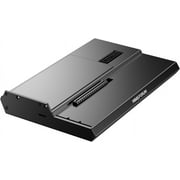
MINISFORUM DEG1 Docking Station,Oculink 4i(PCIe4.0x4), with Force Power On, Support ATX/SFX Power Supply
86% of respondents would recommend this to a friend
Item #:
89284026
MWK 371857
Price Details
Excluding Shipping & Custom charges ( Shipping and custom charges will be calculated on checkout )
*All items will import from US
0 ratings
Write a review
In stock
 Imported from USA store
QTY:
Order now and get it around Tuesday, August 18
Secured transaction
Ubuy works hard to protect your security and privacy. Our advanced payment security system ensures confidentiality by encrypting your information during transmission using AES (Advanced Encryption Standards) and SSL (Secure Socket Layer) protocols. Your payment details are 100% secure as we do not share your payment details with third party sellers.
Our Top Logistics Partners


Upgrade your laptop performance anytime, anywhere with the compact and portable MINISFORUM DEG1 eGPU dock.

Fast
Shipping

Free
Return*

Secure Packaging

100% Original Products

PCI DSS Compliance

ISO 27001 Certified


Note: Step Down Voltage Transformer required for using electronics products of US store (110-120). Recommended power converters Buy Now.


What Stands Out
High-Speed Connection
Oculink 4i interface supports PCIe 4.0 x4, providing exceptional data transfer speeds for demanding applications, significantly outperforming traditional connection standards.
Versatile Power Support
Compatible with ATX/SFX power supplies, this docking station offers flexibility in power options, ensuring reliable performance in various configurations for diverse user needs.
Force Power On
The Force Power On feature allows for hassle-free system wake-up and operation, enhancing user experience by ensuring quick and easy access to connected devices.
Product Details
| Hardware Interface | PCI Express 4.0 |
| Compatible Devices | ATX/SFX |
| Wattage | 65 |
| Minimum Required Operating System Version | Windows 11 |
| Smart Home Compatibility | Not Smart Home Compatible |
| Item Dimensions L x W x H | 5.51"L x 2.56"W x 0.79"H (14 x 6.5 x 2 cm) |
| Color | Black |
| Brand | MINISFORUM |
| Manufacturer | Micro Computer (HK) Tech Limited |
| Model Number | DEG1 |
| Product Dimensions (L x W x H) | 5.51"L x 2.56"W x 0.79"H (14 x 6.5 x 2 cm) |
| Country of Origin | This item will be imported from US |
| What is in the box | MINISFORUM DEG1 Docking Station... For more details, please check description/product details |
| Item Weight | 3.5 lbs (1.59 kg) |
| Date First Available | September 26, 2024 |
Who Should Buy?

-
Gaming Enthusiasts
Ideal for gamers requiring high-speed data transfer and additional connectivity options for multiple devices.
-
Content Creators
Perfect for video editors or designers needing quick access to large storage and reliable power supply.
-
Compact PC Builds
A great addition for small form factor PC users looking to expand connectivity without compromising performance.

-
Casual Users
Not suitable for everyday computer users who do not require advanced features or additional connectivity.
Product Description
MINISFORUM DEG1 Docking Station,Oculink 4i(PCIe4.0x4), with Force Power On, Support ATX/SFX Power Supply
Have any Query? Chat with us
Related Searches
Customer Questions & Answers
-
Question:
What features does the MINISFORUM DEG1 Docking Station offer?
Answer: The MINISFORUM DEG1 Docking Station is equipped with an Oculink 4i PCIe 4.0 x4 interface, which significantly enhances data transfer rates and connectivity options. It supports ATX and SFX power supplies, making it versatile for various setups. Additionally, the Force Power On feature ensures that your components receive sufficient power during initialization, optimizing performance for high-demand usage cases such as gaming, video editing, or running multiple monitors. -
Question:
How do I install the MINISFORUM DEG1 Docking Station?
Answer: Installation is straightforward: first, ensure your desktop is powered off and unplugged. Insert the Oculink 4i PCIe connector into the compatible slot on your motherboard. Then, connect your ATX or SFX power supply to the docking station. Lastly, power on your system, and the Force Power On feature will activate, providing stable energy to the connected devices. This setup is ideal for users looking to expand their workstation capabilities without hassle. -
Question:
Is the MINISFORUM DEG1 Docking Station compatible with all motherboards?
Answer: The DEG1 Docking Station is specifically designed to work with motherboards that have an Oculink port, which is becoming a standard feature in newer motherboard models. Before purchasing, it's crucial to check your motherboard specifications to ensure compatibility. This product is particularly useful for advanced users planning to utilize high-speed data transfer for tasks like 4K video editing or multitasking with various peripherals. -
Question:
What types of devices can I connect to the MINISFORUM DEG1 Docking Station?
Answer: You can connect a variety of devices to the MINISFORUM DEG1 Docking Station, including NVMe SSDs, graphic cards, and additional storage solutions. Due to the high-speed capability of the PCIe 4.0 x4 interface, this docking station is best suited for users who demand high performance, such as gamers or content creators needing fast data access and transfer rates. -
Question:
Does the MINISFORUM DEG1 Docking Station require additional drivers?
Answer: Generally, the MINISFORUM DEG1 Docking Station operates without the need for additional drivers as it leverages standard PCIe connectivity. However, for optimal performance and to ensure all features are recognized by your operating system, it’s advisable to check for any firmware updates provided by MINISFORUM. This will enhance compatibility, especially for more complex setups involving multiple high-performance devices. -
Question:
What is the Force Power On feature in the MINISFORUM DEG1 Docking Station?
Answer: The Force Power On feature allows the docking station to power up connected devices directly when the main system is turned on, ensuring a seamless experience. This feature is particularly useful for users who connect multiple components that require an independent power supply, such as external GPUs or workstations relying on numerous storage devices, making it a critical function for professionals in creative industries. -
Question:
Can the MINISFORUM DEG1 Docking Station be used for gaming?
Answer: Absolutely! The MINISFORUM DEG1 Docking Station is ideal for gaming enthusiasts due to its Oculink 4i PCIe 4.0 x4 interface, which supports high-speed data transfer necessary for modern gaming rigs. The ability to connect up to multiple graphics cards and fast storage solutions allows for optimized gameplay, reducing lag and enhancing loading times for a superior gaming experience. -
Question:
What makes the MINISFORUM DEG1 Docking Station stand out from other docking stations?
Answer: The MINISFORUM DEG1 Docking Station distinguishes itself with its Oculink 4i PCIe 4.0 x4 technology, enabling significantly faster data transfer rates compared to traditional interfaces. Its unique support for both ATX and SFX power supplies, along with the Force Power On feature, provides users with flexibility and enhanced performance, making it an excellent choice for demanding applications in gaming and professional workloads. -
Question:
For what applications is the MINISFORUM DEG1 Docking Station best suited?
Answer: The MINISFORUM DEG1 Docking Station is best suited for applications that require high-speed data transfer, such as video editing, 3D rendering, and gaming. Its robust design and advanced connectivity features allow users to connect multiple high-performance devices, making it ideal for professional users and gamers who need seamless performance and efficiency. This product serves as a powerful hub for any tech-savvy workstation. -
Question:
Where can I buy the MINISFORUM DEG1 Docking Station in Malawi?
Answer: You can buy the MINISFORUM DEG1 Docking Station from Ubuy, a reliable online platform that offers a variety of products including tech gadgets and accessories. Ubuy has a user-friendly interface and provides detailed product descriptions, making it easier for you to find and purchase the DEG1 Docking Station. It’s a great option for customers in Malawi looking for a trustworthy shopping experience.
MINISFORUM Docking Stations DEG1 Editorial Review
No editorial reviews found
Customer Reviews & Ratings
1 customers ratings
-
5 Star
100%
-
4 Star
0%
-
3 Star
0%
-
2 Star
0%
-
1 Star
0%
Review this product
Share your thoughts with other customers
Platform Trust & Buyer Confidence

MA
Mohammad
Verified buyer
“Excellent quality and original too,when ubuy send original things I will appreciate that ,I very satisfied thank you”
23 July 2026 · via Trustpilot
CK
Chitra
Verified buyer
“The order and delivery progress was communicated very well. Package arrived within the estimated time. Products arrived as expected in good condition.”
22-Jul-26 · via Trustpilot
K
kund
Verified buyer
“Good supply of products. Safe payment methods, and shipment worldwide! Genuine products.”
23-Jul-26 · via Trustpilot
OO
Onesi
Verified buyer
“Was my first time buying a product from Ubuy, but I found it so helpful. This is reliable. Gonna place a new order!”
22 July 2026 · via Trustpilot
SJ
SAO JOHN
Verified buyer
“Ubuy is a great online platform to buy stuff. Reliable, fast delivery time and great value for money. I've been using Ubuy online shopping platform for three years now and will continue to do so.”
23 July 2026 · via Trustpilot
Secure Checkout
Global Delivery
Easy Returns
Genuine Products
Related Categories
Related Brands
Top selling MINISFORUM Docking Station in Malawi




Last Updated on July 19, 2026
Product Price History
Important information
- Limitations : For products shipped internationally, please note that any manufacturer warranty may not be valid; manufacturer service options may not be available; product manuals, instructions, and safety warnings may not be in destination country languages; the products (and accompanying materials) may not be designed in accordance with destination country standards, specifications, and labeling requirements; and the products may not conform to destination country voltage and other electrical standards (requiring use of an adapter or converter if appropriate). The recipient is responsible for assuring that the product can be lawfully imported to the destination country. When ordering from Ubuy or its affiliates, the recipient is the importer of record and must comply with all laws and regulations of the destination country.
- Not all the products listed on Ubuy are for sale, as Ubuy is a global search engine. Products are subject to export/trade regulations.
MWK 371857
Order now and get it around Tuesday, August 18
This item is not restrict in my country.(Please click on above link if this item is not restrict in your country, So our team will review and allow.)
QTY:
Secured transaction
PCI DSS compliant and ISO 27001:2022 certified, with encrypted payments and full buyer protection on every order.
Our Top Logistics Partners
Fastest cross-border delivery
Features & Benefits
- Compact design, fits easily in a backpack or handbag.
- Oculink 4i interface supports high data transfer rates up to 64Gbps.
- Compatible with ATX and SFX power supplies for flexibility.
- Accommodates various sizes of graphics cards without length restrictions.
- Smart startup function ensures stable operation and easy switching.
- High-quality components provide reliable signal transmission and protection.
Ubuy Assurance
Experience worry-free shopping with 100% original products, PCI DSS-compliant payment security, ISO 27001-certified data protection, the fastest cross-border delivery, free returns *, and secure packaging on every order.