



0 ratings
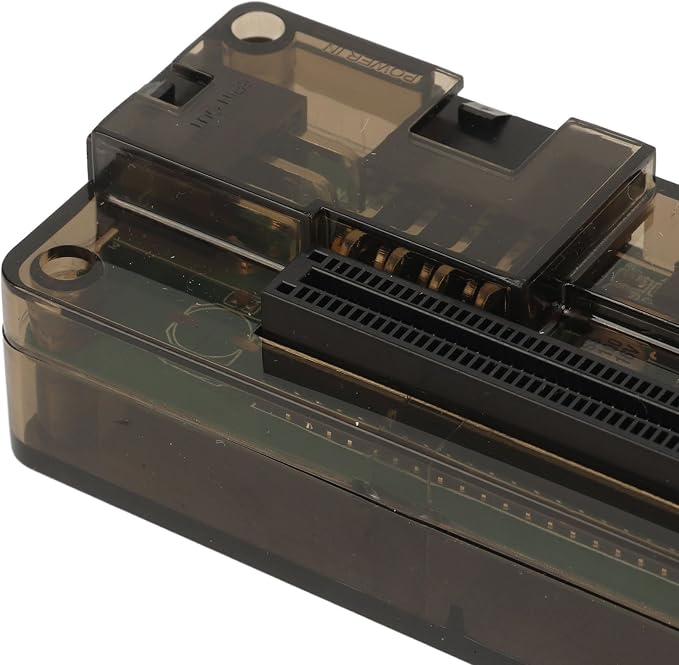
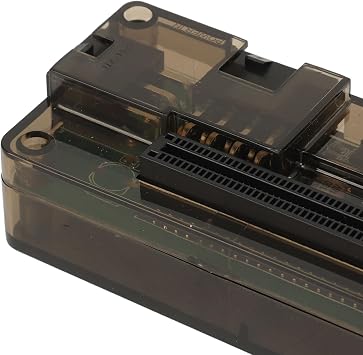
External GPU Dock for Laptop, High-Performance External Graphics Card Adapter, PCIe M.2 M-Key to OCuLink 64GT Docking Station for Notebook
Enhance the performance of your laptop with our external graphics card dock, perfect for gaming and demanding applications.
External GPU Dock for Laptop, High-Performance External Graphics Card Adapter, PCIe M.2 M-Key to OCuLink 64GT Docking Station for Notebook
Item #: 90495423

External GPU Dock for Laptop, High-Performance External Graphics Card Adapter, PCIe M.2 M-Key to OCuLink 64GT Docking Station for Notebook

Item #: 90495423

MWK 262402

Price Details

Excluding Shipping & Custom charges ( Shipping and custom charges will be calculated on checkout )

*All items will import from US

0 ratings Write a review
In stock
us Imported from USA store

QTY:

Order now and get it around Tuesday, August 11
Our Top Logistics Partners
  • fedex
  • dhl
Enhance the performance of your laptop with our external graphics card dock, perfect for gaming and demanding applications.
U-Care Warranty:
None
Select a Plan
fast shipping

Fast
Shipping

free return

Free
Return*

secure packaging

Secure Packaging

100% original products

100% Original Products

pci-dss

PCI DSS Compliance

iso certified

ISO 27001 Certified


paypal payment
visa payment
mastercard payment
Note: Step Down Voltage Transformer required for using electronics products of US store (110-120). Recommended power converters Buy Now.

What Stands Out

Enhanced Graphics Power
Transform your laptop into a gaming machine with high-performance graphics from an external GPU, delivering superior visuals and smoother gameplay experiences compared to integrated graphics.
Easy Connectivity
Compatible with PCIe M2 M Key to OCuLink, this docking station offers seamless installation and integration, allowing users to effortlessly upgrade their systems without complex setups.
Independent Video Card
Dedicated video processing with an external card ensures better performance and multitasking capabilities for gamers and professionals, making it a valuable tool for design, video editing, and intensive applications.

Product Details

Shop External GPU Dock for Laptop, High-Performance External Graphics Card Adapter, PCIe M.2 M-Key to OCuLink 64GT Docking Station for Notebook online at a best price in Malawi. B0DGQLV5BG
  • ENHANCE PERFORMANCE: Laptop video card dock can help them to use a standalone external high performance graphics card, which can be used to enhance the performance of the laptop by using any PCIE interface device, suitable for playing games.
  • 64GT/S: EXP GDC notebook docking station supports PCIe Gen 4.0 high speed transfer, channel data transfer rate up to 64GT/S (maximum) , setting a new standard for data processing speed and efficiency.
  • M.2 M KEY TO OCULINK INTERFACE: The Notebook docking station can be connected to one PCIE PCI Express 16x 4x device, and the converter can be installed inside the system through the M.2 M key to OCuLink interface.
  • POWER SUPPLY INTERFACE: The EXP GDC laptop external video card dock has a 6pin connector for connecting the graphics card power supply and an 8pin connector for connecting the EXP GDC power supply.
  • APPLICATIONS: Industrial applications such as engineering measurement, data acquisition, server debugging, GPU computing, etc. It can also be connected to PCIE interface devices such as graphics cards, sound cards, array cards, etc.
Hardware InterfacePCI Express 4.0
Compatible DevicesMicrosoft Surface Book
Total Usb Ports2
Number of Ports1
Total Number of HDMI Ports1
Wattage50 watts
Input Voltage12 Volts (DC)
Item Dimensions L x W x H7.08"L x 3.93"W x 1.96"H (18 x 10 x 5 cm)
Item Weight167 Grams
BrandDpofirs
ManufacturerDpofirs
Model NumberDpofirsd0gsbga61k
Mfr Part NumberDpofirsd0gsbga61k
Item Type NameDocking Stations
Color#111
Total USB Ports2
Product Dimensions (L x W x H)7.08"L x 3.93"W x 1.96"H (18 x 10 x 5 cm)
Total HDMI Ports1

Who Should Buy?

Suitable For
  • Gamers

    Gamers seeking improved graphics performance can upgrade their laptops with this external graphics card solution.

  • Content Creators

    Professionals in video editing and graphic design will benefit from enhanced graphical power for intensive software applications.

  • Tech Enthusiasts

    Users who enjoy customizing their setups will appreciate the flexibility offered by an external GPU docking station.

Not Suitable For
  • Casual Users

    Users who only perform basic tasks may not need the additional graphics power this product provides.

  • Budget-Conscious

    Those on a tight budget may find the cost of external GPUs not justified for their usage needs.

  • Non-Gaming Laptops

    Laptops without compatible ports may not be able to utilize this external graphics card effectively.

Product Description

Have any Query? Chat with us

Customer Questions & Answers

  • Question: What is an External GPU Dock for Laptop?

    Answer: An External GPU Dock for Laptop is a specialized device that allows you to connect a powerful graphics card to your laptop via PCIe or OCuLink interfaces. This enhances the graphical capabilities of your laptop, enabling you to run graphic-intensive applications, play high-end games, or perform complex video editing tasks. By utilizing the dock, you'll experience improved performance and responsiveness, especially when running demanding software that your laptop's integrated graphics may struggle with.
  • Question: How does the PCIe M.2 M-Key connection work?

    Answer: The PCIe M.2 M-Key connection works by providing a high-speed interface for connecting an external GPU directly to your laptop's motherboard. This dedicated lane allows for faster data transfer, which enhances the performance of your external graphics card. For users involved in gaming or video editing, this means smoother frame rates and faster rendering times. It's crucial to ensure that your laptop supports this interface before purchasing the dock.
  • Question: What are the benefits of using an External Graphics Card Adapter?

    Answer: Using an External Graphics Card Adapter brings significant benefits, such as enhanced graphical processing power and improved multitasking capabilities without the need for a new laptop. This is particularly beneficial for gamers and creative professionals who require high performance for demanding applications. Additionally, most adapters allow for easy upgrade options; if newer graphics cards become available, you can simply swap them into the dock without changing your entire system.
  • Question: Can I use any graphics card with the External GPU Dock?

    Answer: Not all graphics cards are compatible with an External GPU Dock. It's essential to check that the graphics card conforms to the dock's specifications, particularly in terms of power requirements and dimensions. High-performance GPUs work best, but some models may be constrained by the dock’s maximum power output. Most users select popular models that have been tested with the dock for optimal compatibility and performance.
  • Question: Is the External GPU Dock compatible with all laptops?

    Answer: Compatibility may vary based on the laptop model and its available ports. An External GPU Dock requires a compatible PCIe M.2 slot or OCuLink interface to function correctly. Before considering a purchase, you should verify that your laptop meets these requirements. Generally speaking, gaming and workstation laptops are more likely to have the necessary ports compared to standard ultrabooks.
  • Question: How do I set up the External GPU Dock?

    Answer: Setting up the External GPU Dock typically involves connecting the dock to your laptop using the specified PCIe M.2 M-Key or OCuLink interface. Following this, install the appropriate drivers for your graphics card to ensure it recognizes the external GPU. Each dock comes with its own set of instructions which should be followed carefully. This setup allows accessing advanced graphics capabilities with minimal interruption to your workflow.
  • Question: What kind of performance increase can I expect?

    Answer: The performance increase you can expect from an External GPU Dock is substantial, allowing for significant boosts in graphical performance. Users often report smoother frame rates in games, faster rendering speeds in video editing software, and a more responsive experience in 3D modeling applications. The exact performance gain depends on the graphical card used and the specific applications you are running but generally offers a marked improvement.
  • Question: Can I use the External GPU Dock for gaming?

    Answer: Yes, the External GPU Dock is an excellent solution for gaming. It allows you to utilize powerful graphics cards, which can handle modern games at higher settings and resolutions. Gamers can enjoy significantly improved frame rates and graphical fidelity. This adaptability ensures that even laptops with lower-spec integrated graphics can provide a satisfying gaming experience, as you enhance their capability with an external GPU.
  • Question: Where can I buy External GPU Dock for Laptop in Malawi?

    Answer: You can buy the External GPU Dock for Laptop from Ubuy, which provides a wide selection of technology products including high-performance external graphics card adapters. Ubuy ensures you have access to the latest models and brands, making it easier to find a dock that fits your specific needs. With their user-friendly platform, finding the right product is convenient and efficient.

Dpofirs Docking Stations Dpofirsd0gsbga61k Editorial Review

No editorial reviews found

Customer Reviews & Ratings

5.0
1 customers ratings
  • 5 Star
    100%
  • 4 Star
    0%
  • 3 Star
    0%
  • 2 Star
    0%
  • 1 Star
    0%

Review this product

Share your thoughts with other customers

Platform Trust & Buyer Confidence

trustpilot logo
4.3/5 9,000 + reviews
Read reviews
MT
Mohd
Verified buyer

“The product received very good packaging & safe…Thank You”

16 June 2026 · via Trustpilot
SJ
Shawati
Verified buyer

“Accurate delivery timing given”

16 June 2026 · via Trustpilot
YB
Youcef
Verified buyer

“Not madly expensive like I thought, and much quicker than promised.”

15 June 2026 · via Trustpilot
LM
Leila
Verified buyer

“Never dealt with Ubuy before, but everything worked out great. Seamless cross border purchasing and shipping. Thanks!”

6/7/2026 · via Trustpilot
KA
Kwame
Verified buyer

“The process was smooth, with clear communication and timelines. This was my 1st purchase and I am really impressed. I will definitely be coming back.”

12 June 2026 · via Trustpilot
Secure Checkout Global Delivery Easy Returns Genuine Products

Product Price History

Important information

  • Limitations : For products shipped internationally, please note that any manufacturer warranty may not be valid; manufacturer service options may not be available; product manuals, instructions, and safety warnings may not be in destination country languages; the products (and accompanying materials) may not be designed in accordance with destination country standards, specifications, and labeling requirements; and the products may not conform to destination country voltage and other electrical standards (requiring use of an adapter or converter if appropriate). The recipient is responsible for assuring that the product can be lawfully imported to the destination country. When ordering from Ubuy or its affiliates, the recipient is the importer of record and must comply with all laws and regulations of the destination country.
  • Not all the products listed on Ubuy are for sale, as Ubuy is a global search engine. Products are subject to export/trade regulations.