0 ratings

Item #:
89716178
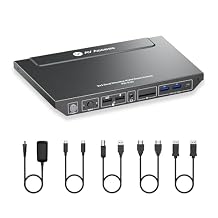
AV Access KVM Switch Docking Station for 2 Monitors 2 Computers, 4K KVM Switch Dual Monitor for Laptop & Desktop, EDID, 1G Ethernet, 100W USB-C
Item #:
89716178
MWK 460597
Price Details
Excluding Shipping & Custom charges ( Shipping and custom charges will be calculated on checkout )
*All items will import from US
0 ratings
Write a review
In stock
 Imported from USA store
QTY:
Order now and get it around Sunday, July 12
Secured transaction
Ubuy works hard to protect your security and privacy. Our advanced payment security system ensures confidentiality by encrypting your information during transmission using AES (Advanced Encryption Standards) and SSL (Secure Socket Layer) protocols. Your payment details are 100% secure as we do not share your payment details with third party sellers.
Our Top Logistics Partners


Transform your workspace with an ultimate 11-in-1 docking station that combines KVM switching and multiple connectivity options for enhanced productivity.

Fast
Shipping

Free
Return*

Secure Packaging

100% Original Products

PCI DSS Compliance

ISO 27001 Certified


Note: Step Down Voltage Transformer required for using electronics products of US store (110-120). Recommended power converters Buy Now.


What Stands Out
Dual Monitor Support
Seamlessly connect two monitors from two computers, enhancing multitasking productivity for both home office and gaming setups.
High-Resolution Output
Supports 4K resolution for crystal-clear visuals, making it perfect for gamers and professionals who require high-definition graphics.
Powerful Charging
Offers 100W USB-C charging, ensuring devices stay powered while in use, eliminating the hassle of multiple chargers.
Product Details
| Item Weight | 3.2 lbs (1.45 kg) |
Who Should Buy?

-
Home Office Users
Perfect for professionals who need to manage multiple computers and monitors efficiently for productivity.
-
Gamers
Ideal for gamers requiring dual monitors for immersive gameplay and quick system switching.
-
Creatives
Benefit graphic designers or video editors needing extensive screen space and reliable hardware connectivity.

-
Casual Users
Not suitable for individuals with basic computing needs who don’t require multiple monitor setups.
-
Budget Buyers
May not be ideal for users seeking low-cost solutions without advanced features or multiple functionality.
-
Single Computer Users
Users who operate only one computer won’t fully utilize the KVM functionality of this product.
Product Description
AV Access KVM Switch Docking Station for 2 Monitors 2 Computers, 4K KVM Switch Dual Monitor for Laptop & Desktop, EDID, 1G Ethernet, 100W USB-C Charging, 3X USB 3.0, Ideal for Home Office & Gaming
Have any Query? Chat with us
Customer Questions & Answers
-
Question:
What is an AV Access KVM Switch with Docking Station?
Answer: The AV Access KVM Switch with Docking Station is a device that allows you to control multiple computers or laptops using a single keyboard, monitor, and mouse setup. It includes advanced features like 100W charging, 4K@60Hz dual monitor support, and multiple USB ports. This setup is ideal for users who want to streamline their workspace while maintaining high-quality visuals. For instance, if you're a gamer or a graphic designer, switching between devices without hassle can significantly enhance your productivity. -
Question:
How does the 4K@60Hz dual monitor support work?
Answer: The KVM switch supports dual monitor connections at a 4K resolution and 60Hz refresh rate, providing stunning visual clarity and smooth performance. This means you can run two monitors simultaneously, perfect for multitasking. For example, you can have your coding environment open on one screen while referencing documentation on another, improving efficiency during your workflow. -
Question:
Can I charge my laptop through the docking station?
Answer: Yes, the AV Access KVM Switch doubles as a docking station with 100W charging capability. This means you can easily power your laptop while using other features of the KVM switch. This is particularly beneficial for professionals who are frequently transitioning between workstations, ensuring that your laptop remains charged while connected for seamless operation throughout the day. -
Question:
What are the connectivity options available with this KVM switch?
Answer: The AV Access KVM Switch includes several connectivity options like HDMI for video output, USB 3.0 ports for peripheral connections, USB-C, and a 1G Ethernet port. This diverse set of connections ensures compatibility with a range of devices, making it a versatile choice for both home and office use. For instance, you can connect printers, external drives, and additional USB accessories effortlessly. -
Question:
Is the AV Access KVM Switch compatible with both Windows and Mac systems?
Answer: Yes, the KVM switch is designed to be compatible with a variety of systems, including Windows and Mac. This universal compatibility allows users to switch seamlessly between different operating systems without any additional setup or difficulty, making it an excellent choice for mixed-environment offices where Windows and Mac devices are used frequently. -
Question:
What does EDID stand for and why is it important?
Answer: EDID stands for Extended Display Identification Data. It is a data structure provided by a display to describe its capabilities to a video source. In the context of the KVM switch, EDID ensures that the correct display settings are automatically set when you switch between devices. This is particularly important for maintaining optimal resolution and refresh rates, preventing display issues during transitions. -
Question:
How do I switch between connected devices?
Answer: Switching between devices connected to the AV Access KVM Switch is simple and can typically be done via a button on the unit or through a keyboard shortcut. This allows for quick and efficient transitions between devices, which is ideal for users who need to juggle multiple systems throughout their day—whether for work or gaming, this feature enhances overall usability. -
Question:
Can this KVM switch support USB-C laptops?
Answer: Absolutely! The AV Access KVM Switch provides a dedicated USB-C port, enabling direct connections to USB-C laptops and devices. This is particularly beneficial for modern laptops which rely heavily on USB-C for data transfer and charging. Utilizing this feature can significantly simplify your setup while ensuring high-speed connectivity for data-intensive applications. -
Question:
Is it possible to connect peripherals like printers or webcams?
Answer: Yes, the KVM switch features three USB 3.0 ports that can be used to connect various peripherals like printers, webcams, and external hard drives. This flexibility makes it an ideal solution for users who need to maintain multiple devices in their workspace. For example, if you're working from home and require a webcam for meetings, you can easily connect it through the KVM without needing to swap cables. -
Question:
Where can I buy the AV Access KVM Switch with Docking Station?
Answer: You can purchase the AV Access KVM Switch with Docking Station from Ubuy in Malawi. Ubuy offers a wide selection of electronics and accessories, ensuring you receive a great product along with reliable customer service.
vAVAccess KVM Switches Editorial Review
No editorial reviews found
Customer Reviews & Ratings
1 customers ratings
-
5 Star
100%
-
4 Star
0%
-
3 Star
0%
-
2 Star
0%
-
1 Star
0%
Review this product
Share your thoughts with other customers
Platform Trust & Buyer Confidence

MT
Mohd
Verified buyer
“The product received very good packaging & safe…Thank You”
16 June 2026 · via Trustpilot
SJ
Shawati
Verified buyer
“Accurate delivery timing given”
16 June 2026 · via Trustpilot
YB
Youcef
Verified buyer
“Not madly expensive like I thought, and much quicker than promised.”
15 June 2026 · via Trustpilot
LM
Leila
Verified buyer
“Never dealt with Ubuy before, but everything worked out great. Seamless cross border purchasing and shipping. Thanks!”
6/7/2026 · via Trustpilot
KA
Kwame
Verified buyer
“The process was smooth, with clear communication and timelines. This was my 1st purchase and I am really impressed. I will definitely be coming back.”
12 June 2026 · via Trustpilot
Secure Checkout
Global Delivery
Easy Returns
Genuine Products
Product Price History
Important information
- Limitations : For products shipped internationally, please note that any manufacturer warranty may not be valid; manufacturer service options may not be available; product manuals, instructions, and safety warnings may not be in destination country languages; the products (and accompanying materials) may not be designed in accordance with destination country standards, specifications, and labeling requirements; and the products may not conform to destination country voltage and other electrical standards (requiring use of an adapter or converter if appropriate). The recipient is responsible for assuring that the product can be lawfully imported to the destination country. When ordering from Ubuy or its affiliates, the recipient is the importer of record and must comply with all laws and regulations of the destination country.
- Not all the products listed on Ubuy are for sale, as Ubuy is a global search engine. Products are subject to export/trade regulations.
MWK 460597
Order now and get it around Sunday, July 12
This item is not restrict in my country.(Please click on above link if this item is not restrict in your country, So our team will review and allow.)
QTY:
Secured transaction
PCI DSS compliant and ISO 27001:2022 certified, with encrypted payments and full buyer protection on every order.
Our Top Logistics Partners
Fastest cross-border delivery
Features & Benefits
- 11-in-1 docking station enhances productivity.
- Supports dual HDMI displays up to 4K@60Hz.
- Equipped with extensive USB connectivity for rapid data transfer.
- Includes a built-in Ethernet port for stable internet access.
- Fast 100W USB-C charging reduces clutter from multiple chargers.
- Sleek, modern design fits any home or office setup.
Ubuy Assurance
Experience worry-free shopping with 100% original products, PCI DSS-compliant payment security, ISO 27001-certified data protection, the fastest cross-border delivery, free returns *, and secure packaging on every order.