



- Home Page /
- Office Products /
- Office Electronics /
- Printers & Accessories /
- Printer Parts & Accessories /
- Printer Ink & Toner /
- Inkjet Ink Cartridges /
- Best Printers L3110 Maintenance Box Replaceme...
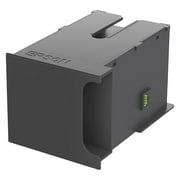
Best Printers L3110 Maintenance Box Replacement Waste Ink Pad for EPSON ET-2720 ET-2803 ET-2800 ET-2711 ET-4700, L3110, L3210, L3150, L3250
MWK 56185
Price Details
Excluding Shipping & Custom charges ( Shipping and custom charges will be calculated on checkout )
*All items will import from US
QTY:
Ubuy works hard to protect your security and privacy. Our advanced payment security system ensures confidentiality by encrypting your information during transmission using AES (Advanced Encryption Standards) and SSL (Secure Socket Layer) protocols. Your payment details are 100% secure as we do not share your payment details with third party sellers.
A waste ink pad replacement is essential for maintaining your printer's performance.
Fast
Shipping
Free
Return*
Secure Packaging
100% Original Products
PCI DSS Compliance
ISO 27001 Certified
What Stands Out
Product Details
| Country of Origin | This item will be imported from US |
| Item Weight | 0.5 lbs (230 grams) |
| What is in the box | Best Printers L3110 Maintenance... For more details, please check description/product details |
Who Should Buy?
-
Frequent Epson Users
Ideal for users with high print volumes needing regular waste ink pad replacements for uninterrupted printing.
-
Home Offices
Perfect for home office setups where consistent printing is required along with maintenance to prevent issues.
-
DIY Enthusiasts
Great for individuals comfortable with printer maintenance who prefer replacing components instead of replacing printers.
-
Casual Printers
Not suitable for infrequent users who rarely print and may not need regular maintenance replacements.
-
Non-Epson Users
Users with printers from brands other than Epson will find this product incompatible and ineffective.
-
Technically Challenged
Not ideal for individuals uncomfortable with DIY repairs or maintenance on their printers.
Product Description
Best Printers L3110 Maintenance Box Replacement Waste Ink Pad for EPSON ET-2720 ET-2803 ET-2800 ET-2711 ET-4700, L3110, L3210, L3150, L3250
Customer Questions & Answers
-
Question:
What is a Maintenance Box Replacement Waste Ink Pad for Epson printers?
Answer: The Maintenance Box Replacement Waste Ink Pad is a component designed to collect excess ink during printer cleaning and maintenance cycles. In Epson ET-2720, ET-2803, ET-2800, ET-2711, and ET-4700 models, this pad plays a crucial role in preventing ink overflow and ensuring the printer functions efficiently. When this component fills up, it can lead to ink leakage or printer errors. Regular replacement ensures optimal performance, reduces downtime, and maintains print quality. -
Question:
How do I know when to replace the waste ink pad in my Epson printer?
Answer: Indicators that your Epson printer requires a waste ink pad replacement include error messages on the display panel or a decline in print quality due to ink build-up. Additionally, a blinking status light may signal maintenance needs. To check if the waste ink pad is saturated, you can review printer settings or use Epson’s utility software to inspect the waste tank status. Timely replacement not only extends the printer's lifespan but also maintains consistent print results. -
Question:
Can I replace the waste ink pad myself?
Answer: Yes, replacing the waste ink pad can be done by users comfortable with basic printer maintenance. The process generally involves turning off the printer, opening the printer cover, and locating the waste ink pad compartment. It's essential to follow your specific printer model's manual for precise instructions. Proper installation ensures that the new pad correctly collects excess ink, preventing further issues. This DIY approach saves costs and enhances your printer's reliability. -
Question:
Where can I find a suitable replacement for the Epson waste ink pad?
Answer: You can find compatible waste ink pads for Epson printers at various online retailers, including specialized printer parts stores. It's crucial to ensure that the replacement part matches your printer model's specifications. Researching user reviews will guide you in selecting a reliable product, thus ensuring your printer's uninterrupted service. Proper sourcing can significantly impact the longevity and performance of your printer. -
Question:
How do I dispose of the old waste ink pad responsibly?
Answer: Disposing of the old waste ink pad should be done in compliance with local regulations regarding electronic waste and ink disposal. Many communities have specific sites for recycling printer parts. It's advisable to seal the used pad in a plastic bag to prevent leakage. Responsible disposal not only helps the environment but also encourages sustainable practices in technology use. Always check local guidelines for the best disposal methods. -
Question:
What issues can arise from not replacing the waste ink pad in my Epson printer?
Answer: Failure to replace the waste ink pad can lead to several issues, including ink overflow, printer malfunctions, and even permanent damage to the printer's internal components. When the pad is saturated, it can cause ink to leak onto the internal parts or surfaces. This can result in print quality degradation and errors that hinder operation. Regular maintenance, including timely waste pad replacement, ensures a smoother printing experience and avoids unexpected repairs. -
Question:
Is there a specific procedure for resetting my printer after replacing the waste ink pad?
Answer: Yes, after replacing the waste ink pad, it's necessary to reset the ink pad counter to inform the printer that the component has been changed. This typically involves accessing the printer’s maintenance settings through its software or using a specific reset tool recommended by Epson. Failing to reset the counter can result in continued error messages and printer blocks. Properly resetting ensures your printer operates smoothly and efficiently after maintenance. -
Question:
Are there any aftermarket alternatives for the Epson waste ink pads?
Answer: Yes, there are aftermarket alternatives available for the Epson waste ink pads. While original equipment manufacturer (OEM) parts offer reliable quality, some aftermarket options may provide a more economical choice without sacrificing performance. However, it's essential to ensure these alternatives are compatible with your specific models, such as the ET-2720 or ET-2800. Researching reviews and product reliability can help you find a trustworthy option that meets your needs. -
Question:
Can I clean and reuse my waste ink pad instead of replacing it?
Answer: Cleaning and reusing a waste ink pad is generally not recommended, as these pads are designed for one-time use and become saturated with ink over time. If a pad is cleaned, it may not effectively absorb excess ink in the future. Additionally, improper cleaning can introduce contaminants that could affect print quality. For optimal printer performance, it’s best to replace the pad regularly with a new one designed for your specific Epson model. -
Question:
Where can I buy Maintenance Box Replacement Waste Ink Pad for Epson ET-2720, ET-2803, ET-2800, ET-2711, ET-4700?
Answer: You can buy the Maintenance Box Replacement Waste Ink Pad for Epson ET-2720, ET-2803, ET-2800, ET-2711, ET-4700 at Ubuy. This platform offers a range of genuine and compatible printer parts, ensuring you receive high-quality replacements quickly. Ubuy is known for its extensive inventory and reliable service, making it a great choice for maintaining your Epson printer's performance. Browse their website for the best options available in Malawi.
BestPrinters Inkjet Ink Cartridges Editorial Review
Customer Reviews & Ratings
-
5 Star
100%
-
4 Star
0%
-
3 Star
0%
-
2 Star
0%
-
1 Star
0%
Review this product
Share your thoughts with other customers
Platform Trust & Buyer Confidence
“The product received very good packaging & safe…Thank You”
“Accurate delivery timing given”
“Not madly expensive like I thought, and much quicker than promised.”
“Never dealt with Ubuy before, but everything worked out great. Seamless cross border purchasing and shipping. Thanks!”
“The process was smooth, with clear communication and timelines. This was my 1st purchase and I am really impressed. I will definitely be coming back.”
Product Price History
Important information
- Limitations : For products shipped internationally, please note that any manufacturer warranty may not be valid; manufacturer service options may not be available; product manuals, instructions, and safety warnings may not be in destination country languages; the products (and accompanying materials) may not be designed in accordance with destination country standards, specifications, and labeling requirements; and the products may not conform to destination country voltage and other electrical standards (requiring use of an adapter or converter if appropriate). The recipient is responsible for assuring that the product can be lawfully imported to the destination country. When ordering from Ubuy or its affiliates, the recipient is the importer of record and must comply with all laws and regulations of the destination country.
- Not all the products listed on Ubuy are for sale, as Ubuy is a global search engine. Products are subject to export/trade regulations.
MWK 56185
Order now and get it around Sunday, July 12
This item is not restrict in my country.(Please click on above link if this item is not restrict in your country, So our team will review and allow.)
QTY:
PCI DSS compliant and ISO 27001:2022 certified, with encrypted payments and full buyer protection on every order.
Features & Benefits
- Essential for maintaining printer performance.
- Compatible with ET-2720, ET-2803, ET-2800, ET-2711, ET-4700 models.
- Includes waste ink pad with sponge.
- Comes with a seal bag for secure storage.
- Disposable gloves included for easy handling.
- Ensures your printer operates efficiently and effectively.
Ubuy Assurance
Experience worry-free shopping with 100% original products, PCI DSS-compliant payment security, ISO 27001-certified data protection, the fastest cross-border delivery, free returns *, and secure packaging on every order.