0 ratings

Item #:
86877960
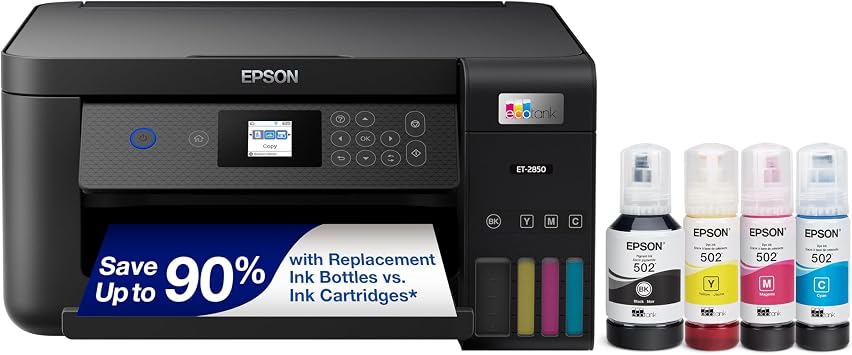
Epson EcoTank ET-2850 Wireless Color All-in-One Cartridge-Free Supertank Printer with Scan, Copy and Auto 2-Sided Printing - Black, Medium
Item #:
86877960
0 ratings
Write a review
Out of stock
 Imported from USA store
Secured transaction
Ubuy works hard to protect your security and privacy. Our advanced payment security system ensures confidentiality by encrypting your information during transmission using AES (Advanced Encryption Standards) and SSL (Secure Socket Layer) protocols. Your payment details are 100% secure as we do not share your payment details with third party sellers.
Our Top Logistics Partners


Save up to 90% with each replacement ink set – one set of Epson EcoFit ink bottles is equivalent to about 90 ink cartridges.

Fast
Shipping

Free
Return*

Secure Packaging

100% Original Products

PCI DSS Compliance

ISO 27001 Certified


Note: Step Down Voltage Transformer required for using electronics products of US store (110-120). Recommended power converters Buy Now.


What Stands Out
Cartridge-Free Design
The EcoTank ET-2850 eliminates the hassle and cost of traditional cartridges, featuring a high-capacity ink tank system that allows for thousands of vibrant color prints with minimal upkeep.
Wireless Connectivity
Easily print from anywhere in your home or office with seamless wireless connectivity, compatible with mobile devices and cloud services for ultimate convenience and flexibility in printing tasks.
Versatile Functionality
This all-in-one printer combines scanning, copying, and auto 2-sided printing, making it an efficient solution for both personal and professional use, enhancing productivity with every print job.
Product Details
| Item Weight | 13.2 lbs (5.99 kg) |
Who Should Buy?

-
Home Office Users
Ideal for users needing an efficient, multifunction printer for documents, scanning, and copying without frequent ink replacements.
-
Frequent Print Users
Perfect for individuals or families who print large volumes regularly and benefit from cost-effective, cartridge-free ink.
-
Students
Students can efficiently print, scan, and copy assignments or study materials at home without worrying about high ink costs.

-
Casual Casual Users
Not ideal for users with infrequent printing needs as initial cost and maintenance may outweigh benefits.
-
Photographers
Photographers seeking high-quality photo prints may find the color accuracy insufficient compared to dedicated photo printers.
-
Compact Spaces
The medium size may not fit well in extremely small environments, limiting placement options for users with space constraints.
Product Description
Epson EcoTank ET-2850 Wireless Color All-in-One Cartridge-Free Supertank Printer with Scan, Copy and Auto 2-Sided Printing - Black, Medium
Have any Query? Chat with us
Customer Questions & Answers
-
Question:
What is the primary advantage of the cartridge-free technology in the Epson EcoTank ET-2850?
Answer: The primary advantage of cartridge-free technology in the Epson EcoTank ET-2850 is its ability to drastically reduce printing costs over time. Instead of relying on traditional ink cartridges, this printer utilizes large refillable ink tanks that allow users to print thousands of pages with a single set of ink bottles. This is not only more economical but also environmentally friendly, minimizing plastic waste from discarded cartridges. For businesses or households with heavy printing needs, this model can be an excellent choice, offering convenience and savings. -
Question:
How does the wireless printing feature work for the Epson EcoTank ET-2850?
Answer: The wireless printing feature in the Epson EcoTank ET-2850 enables users to print documents and images seamlessly from multiple devices, including smartphones, tablets, and computers, without the need for physical connection through cables. By connecting to Wi-Fi, the printer integrates with various printing apps and platforms like Apple AirPrint and Google Cloud Print. This allows for convenient remote printing, making it ideal for busy individuals or small offices where multiple users need access to the same printer. -
Question:
Can the Epson EcoTank ET-2850 print documents on both sides automatically?
Answer: Yes, the Epson EcoTank ET-2850 features automatic double-sided printing, allowing users to create professional-looking documents while conserving paper. This functionality is particularly useful for those who frequently print reports, presentations, or any multi-page documents, as it reduces the overall paper consumption. By leveraging this feature, users can contribute to eco-friendly practices and maintain a tidy desk space with fewer loose pages. -
Question:
What types of media can the Epson EcoTank ET-2850 print on?
Answer: The Epson EcoTank ET-2850 is versatile in terms of media handling, accommodating various paper types and sizes including plain paper, photo paper, and envelopes. It supports different sizes ranging from letter and legal to 4x6 and 5x7 inch photo formats. This versatility makes it suitable for both standard office documents and premium-quality photo printing, catering to different user needs whether for personal or professional projects. -
Question:
Does the Epson EcoTank ET-2850 come with a mobile printing app?
Answer: Yes, the Epson EcoTank ET-2850 is compatible with the Epson iPrint mobile app, which allows users to print and scan documents directly from their mobile devices. The app supports various functionalities such as checking ink levels and accessing photos stored on smartphones or tablets. This feature enhances convenience for on-the-go printing and document management, making it an ideal solution for users who prefer mobile technology for their printing tasks. -
Question:
How is the scanning and copying function handled by the Epson EcoTank ET-2850?
Answer: The Epson EcoTank ET-2850 includes a flatbed scanner that provides high-quality scanning and copying capabilities. Users can scan documents in various formats and resolutions, making it a great tool for archiving important papers or creating digital copies of photos. The copy function allows for easy duplication of documents, which is valuable for students, professionals, or anyone needing to reproduce materials quickly and effectively. -
Question:
Is the Epson EcoTank ET-2850 suitable for home office use?
Answer: Absolutely, the Epson EcoTank ET-2850 is excellent for home office use, thanks to its multifunctional capabilities of printing, scanning, and copying. Its high-capacity ink tanks provide long-lasting performance without constant refills, which is a significant advantage for home-based entrepreneurs or remote workers with increased printing needs. Furthermore, its wireless connectivity and compact design allow for flexible placement, ensuring that it fits seamlessly into any home office setup. -
Question:
What is the print speed of the Epson EcoTank ET-2850?
Answer: The Epson EcoTank ET-2850 offers impressive print speeds, generally around 10.5 pages per minute for black and white prints and approximately 5 pages per minute for color. This makes it efficient for handling various print jobs, whether you’re rapidly printing drafts or creating full-color documents. Quick printing is particularly beneficial for users who want to maximize productivity and minimize waiting time for completed tasks. -
Question:
How do I maintain the Epson EcoTank ET-2850 for optimal performance?
Answer: Maintaining the Epson EcoTank ET-2850 for optimal performance involves regular cleaning of the print head and ensuring that the ink levels are sufficient. Utilizing the printer’s built-in maintenance tools accessible through the settings menu can help resolve any minor issues. Additionally, keeping the printer in a dust-free environment and using high-quality paper can prevent paper jams and ensure clear prints. Regular maintenance enhances the longevity and reliability of the printer’s performance. -
Question:
Where can I buy Epson EcoTank ET-2850 Wireless Color All-in-One Printer in Malawi?
Answer: You can buy the Epson EcoTank ET-2850 Wireless Color All-in-One Printer from Ubuy in Malawi. Ubuy is a reliable online platform that offers a wide variety of products, including top-rated printers like the EcoTank ET-2850. They provide convenient shopping options and a user-friendly interface, ensuring your experience is seamless as you find and purchase the printer to meet your home or office printing needs.
Epson Editorial Review
No editorial reviews found
Customer Reviews & Ratings
1 customers ratings
-
5 Star
100%
-
4 Star
0%
-
3 Star
0%
-
2 Star
0%
-
1 Star
0%
Review this product
Share your thoughts with other customers
Platform Trust & Buyer Confidence

MT
Mohd
Verified buyer
“The product received very good packaging & safe…Thank You”
16 June 2026 · via Trustpilot
SJ
Shawati
Verified buyer
“Accurate delivery timing given”
16 June 2026 · via Trustpilot
YB
Youcef
Verified buyer
“Not madly expensive like I thought, and much quicker than promised.”
15 June 2026 · via Trustpilot
LM
Leila
Verified buyer
“Never dealt with Ubuy before, but everything worked out great. Seamless cross border purchasing and shipping. Thanks!”
6/7/2026 · via Trustpilot
KA
Kwame
Verified buyer
“The process was smooth, with clear communication and timelines. This was my 1st purchase and I am really impressed. I will definitely be coming back.”
12 June 2026 · via Trustpilot
Secure Checkout
Global Delivery
Easy Returns
Genuine Products
Product Price History
Important information
- Limitations : For products shipped internationally, please note that any manufacturer warranty may not be valid; manufacturer service options may not be available; product manuals, instructions, and safety warnings may not be in destination country languages; the products (and accompanying materials) may not be designed in accordance with destination country standards, specifications, and labeling requirements; and the products may not conform to destination country voltage and other electrical standards (requiring use of an adapter or converter if appropriate). The recipient is responsible for assuring that the product can be lawfully imported to the destination country. When ordering from Ubuy or its affiliates, the recipient is the importer of record and must comply with all laws and regulations of the destination country.
- Not all the products listed on Ubuy are for sale, as Ubuy is a global search engine. Products are subject to export/trade regulations.
Currently unavailable.
We don't know when or if this item will be back in stock.
This item is not restrict in my country.(Please click on above link if this item is not restrict in your country, So our team will review and allow.)
Secured transaction
PCI DSS compliant and ISO 27001:2022 certified, with encrypted payments and full buyer protection on every order.
Our Top Logistics Partners
Fastest cross-border delivery
Features & Benefits
- Fast, affordable, and easy-to-use printer.
- Innovative cartridge-free solution using high-capacity ink tanks.
- Outstanding print quality and auto-duplex printing.
- High-resolution flatbed scanner with convenient color display.
- Eco-friendly design that reduces plastic waste.
- Epson recommends genuine ink for optimal performance.
Ubuy Assurance
Experience worry-free shopping with 100% original products, PCI DSS-compliant payment security, ISO 27001-certified data protection, the fastest cross-border delivery, free returns *, and secure packaging on every order.