0 ratings

Item #:
86023674
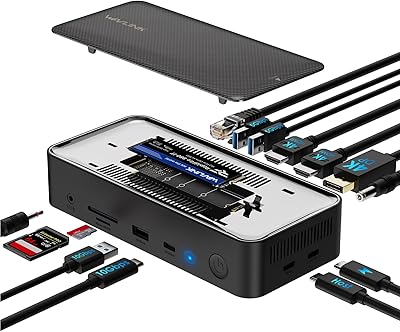
WAVLINK Laptop Docking Station 3 Monitors, 12 in 1 USB Hub with 10Gbps M.2 PCIeSATA SSD Enclosure, Expands MacBookMac mini M4M3M2M1, 4K@60Hz HDMIDP,
Item #:
86023674
0 ratings
Write a review
Out of stock
 Imported from USA store
Secured transaction
Ubuy works hard to protect your security and privacy. Our advanced payment security system ensures confidentiality by encrypting your information during transmission using AES (Advanced Encryption Standards) and SSL (Secure Socket Layer) protocols. Your payment details are 100% secure as we do not share your payment details with third party sellers.
Our Top Logistics Partners


With 13 ports in one dock, this versatile docking station is designed to allow seamless integration between your devices and the host system.

Fast
Shipping

Free
Return*

Secure Packaging

100% Original Products

PCI DSS Compliance

ISO 27001 Certified


Note: Step Down Voltage Transformer required for using electronics products of US store (110-120). Recommended power converters Buy Now.


What Stands Out
Triple Monitor Support
Effortlessly expand your workspace with support for three monitors, enabling multitasking at a whole new level for your MacBook or Mac mini.
High-Speed Connectivity
Enjoy lightning-fast data transfer with 10Gbps support for M.2 PCIe/SATA SSDs, ensuring quick access to your files and seamless operations.
Versatile Ports
With 13 diverse ports including HDMI, DP, USB-C, and Gigabit RJ45, this docking station meets all your connectivity needs, simplifying your setup.
Product Details
| Item Weight | 1.73 lbs (780 grams) |
Who Should Buy?

-
Creative Professionals
Ideal for graphic designers and video editors needing multiple displays to enhance productivity and workflow.
-
Tech Enthusiasts
Perfect for users wanting to maximize their MacBook or Mac mini performance with expanded connectivity options and speed.
-
Remote Workers
A great choice for remote workers who require multiple peripherals and monitors for a versatile home office setup.

-
Casual Users
Not suitable for casual users who only need basic connectivity without high-performance requirements.
-
Travelers
Bulkiness and weight may be impractical for those needing a portable solution on-the-go.
-
Budget-Conscious Buyers
Higher price point means this product might not be suitable for those with limited budgets seeking basic docking options.
Product Description
WAVLINK Laptop Docking Station 3 Monitors, 12 in 1 USB Hub with 10Gbps M.2 PCIeSATA SSD Enclosure, Expands MacBookMac mini M4M3M2M1, 4K@60Hz HDMIDP, 100W PD, USB CUSB A, SDTF, Gigabit RJ45
Have any Query? Chat with us
Customer Questions & Answers
-
Question:
What devices are compatible with the WAVLINK USB C Docking Station?
Answer: The WAVLINK USB C Docking Station is designed primarily for MacBook models, including MacBook Air and MacBook Pro, as well as Mac Mini models M1, M2, M3, and M4. This docking station works seamlessly with devices that support USB-C connectivity. Its versatility extends to laptops and tablets from other manufacturers that feature USB-C ports, making it an ideal accessory for a variety of users. You can effectively expand your setup for both work and entertainment purposes. -
Question:
How does the 10Gbps M.2 PCIe SATA SSD enclosure work?
Answer: The 10Gbps M.2 PCIe SATA SSD enclosure allows you to install an M.2 SSD, enabling you to boost storage capacity significantly. This feature is particularly beneficial for users who require additional space for high-resolution videos, large files, or extensive software applications. When connected, it provides fast data transfer speeds, maximizing workflow efficiency whether you’re editing videos, running virtual machines, or simply accessing large databases. -
Question:
Can I connect three monitors to this docking station simultaneously?
Answer: Yes, the WAVLINK USB C Docking Station supports connecting up to three monitors at once. This capability allows users to expand their workspace significantly, making multitasking easier and more organized. With support for 4K@60Hz resolution, you can enjoy crisp visuals and smooth performance for presentations, gaming, or professional content creation, resulting in a more productive workflow. -
Question:
What ports are available on the WAVLINK USB C Docking Station?
Answer: The WAVLINK USB C Docking Station is equipped with an extensive array of ports, including HDMI, DisplayPort, and USB-A and USB-C ports, along with an SD/microSD card reader. This wide variety allows you to connect external displays, peripherals, and storage devices, transforming your device into a comprehensive workstation. Whether you're a gamer needing additional inputs or a professional handling multiple projects simultaneously, this dock caters to various needs. -
Question:
Is the docking station powered or does it require an external power source?
Answer: The WAVLINK USB C Docking Station is powered via a USB-C connection from your laptop or a compatible power source. This provides sufficient power to charge your connected devices while supporting data transfer. Using it eliminates the clutter of multiple adapters and power cords, making your setup cleaner and more efficient, especially in shared or compact workspaces. -
Question:
Does this docking station support 4K displays?
Answer: Absolutely! The WAVLINK USB C Docking Station supports 4K@60Hz resolution on compatible displays when connected via HDMI or DisplayPort. This makes it an excellent choice for graphic design, video editing, and high-definition gaming. The clarity and detail provided by 4K resolution enhance visual experiences, making this dock ideal for multimedia professionals or anyone who appreciates high-quality visuals. -
Question:
What is the benefit of a USB C hub compared to traditional USB hubs?
Answer: USB C hubs, like the WAVLINK Docking Station, offer advanced features compared to traditional USB hubs, including faster data transfer rates and support for video output. With up to 10Gbps speeds, USB C provides superior bandwidth for data-heavy applications. Additionally, the versatility in connectivity standards enhances compatibility with newer devices and accessories, streamlining your workspace and improving overall productivity. -
Question:
How can I effectively use this docking station for remote work?
Answer: The WAVLINK USB C Docking Station is an excellent investment for remote work. By connecting multiple monitors, a keyboard, a mouse, and additional storage, you can create a more extensive and productive home office setup. This allows seamless switching between tasks, providing a more organized view of your applications and documents, which is particularly useful during video calls or while collaborating on projects. -
Question:
How do I set up the WAVLINK USB C Docking Station?
Answer: Setting up the WAVLINK USB C Docking Station is straightforward. Connect the dock to your MacBook or compatible device using the USB-C cable, then plug in your monitors, peripherals, and storage devices as needed. Usually, your operating system will automatically recognize the dock and its connected devices. This plug-and-play functionality allows you to get started quickly without complicated installation processes. -
Question:
Where can I buy the WAVLINK USB C Docking Station?
Answer: You can purchase the WAVLINK USB C Docking Station through Ubuy in Malawi. Ubuy offers a straightforward online shopping experience, ensuring you can access this versatile docking station easily and efficiently.
WAVLINK Docking Stations Editorial Review
No editorial reviews found
Customer Reviews & Ratings
1 customers ratings
-
5 Star
0%
-
4 Star
100%
-
3 Star
0%
-
2 Star
0%
-
1 Star
0%
Review this product
Share your thoughts with other customers
Platform Trust & Buyer Confidence

MT
Mohd
Verified buyer
“The product received very good packaging & safe…Thank You”
16 June 2026 · via Trustpilot
SJ
Shawati
Verified buyer
“Accurate delivery timing given”
16 June 2026 · via Trustpilot
YB
Youcef
Verified buyer
“Not madly expensive like I thought, and much quicker than promised.”
15 June 2026 · via Trustpilot
LM
Leila
Verified buyer
“Never dealt with Ubuy before, but everything worked out great. Seamless cross border purchasing and shipping. Thanks!”
6/7/2026 · via Trustpilot
KA
Kwame
Verified buyer
“The process was smooth, with clear communication and timelines. This was my 1st purchase and I am really impressed. I will definitely be coming back.”
12 June 2026 · via Trustpilot
Secure Checkout
Global Delivery
Easy Returns
Genuine Products
Product Price History
Important information
- Limitations : For products shipped internationally, please note that any manufacturer warranty may not be valid; manufacturer service options may not be available; product manuals, instructions, and safety warnings may not be in destination country languages; the products (and accompanying materials) may not be designed in accordance with destination country standards, specifications, and labeling requirements; and the products may not conform to destination country voltage and other electrical standards (requiring use of an adapter or converter if appropriate). The recipient is responsible for assuring that the product can be lawfully imported to the destination country. When ordering from Ubuy or its affiliates, the recipient is the importer of record and must comply with all laws and regulations of the destination country.
- Not all the products listed on Ubuy are for sale, as Ubuy is a global search engine. Products are subject to export/trade regulations.
Currently unavailable.
We don't know when or if this item will be back in stock.
This item is not restrict in my country.(Please click on above link if this item is not restrict in your country, So our team will review and allow.)
Secured transaction
PCI DSS compliant and ISO 27001:2022 certified, with encrypted payments and full buyer protection on every order.
Our Top Logistics Partners
Fastest cross-border delivery
Features & Benefits
- 13-in-1 docking station offers diverse connectivity options for easy device integration.
- Supports 4K triple display with multiple HDMI and DisplayPort connections.
- Integrated M.2 SSD enclosure for rapid file transfers up to 10Gbps.
- 100W power delivery for hassle-free laptop charging.
- Wide compatibility with Thunderbolt 3/4 laptops and USB-C devices.
- No driver installation required for instant use.
Ubuy Assurance
Experience worry-free shopping with 100% original products, PCI DSS-compliant payment security, ISO 27001-certified data protection, the fastest cross-border delivery, free returns *, and secure packaging on every order.