- Home Page /
- Electronics /
- Computer Accessories /
- Computer Accessories & Peripherals /
- Keyboards, Mice & Accessories /
- Keyboard & Mice Accessories /
- Keyboard Skins /
- Adobe Premiere Keyboard Stickers
0 ratings

Item #:
58085251
Adobe Premiere Keyboard Stickers
Item #:
58085251
MWK 42968
Price Details
Excluding Shipping & Custom charges ( Shipping and custom charges will be calculated on checkout )
*All items will import from US
0 ratings
Write a review
In stock
 Imported from USA store
QTY:
Order now and get it around Saturday, July 04
Secured transaction
Ubuy works hard to protect your security and privacy. Our advanced payment security system ensures confidentiality by encrypting your information during transmission using AES (Advanced Encryption Standards) and SSL (Secure Socket Layer) protocols. Your payment details are 100% secure as we do not share your payment details with third party sellers.
Our Top Logistics Partners


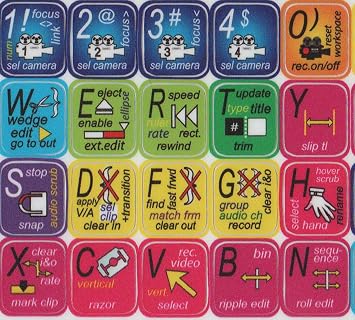
Make editing with Adobe Premiere software easy and efficient with high-quality keyboard stickers designed to help remember shortcut buttons.

Fast
Shipping

Free
Return*

Secure Packaging

100% Original Products

PCI DSS Compliance

ISO 27001 Certified


Note: Step Down Voltage Transformer required for using electronics products of US store (110-120). Recommended power converters Buy Now.


What Stands Out
Visual Workflow
Enhance your editing efficiency with color-coded keyboard stickers, providing quick visual access to essential Adobe Premiere shortcuts, streamlining your workflow and saving valuable time.
Durable Material
Made from high-quality, tear-resistant vinyl, these stickers withstand heavy use, ensuring lasting performance while maintaining vibrant colors and clarity for clear visibility during editing sessions.
Universal Fit
Designed to fit standard keyboards, these stickers adapt to various layouts, making them ideal for both Mac and PC users, providing a versatile solution for any video editing setup.
Product Details
| Item Weight | 0.1 lbs (50 grams) |
Who Should Buy?

-
Beginner Editors
Ideal for novice editors wanting to learn shortcuts and improve workflow efficiency during video editing in Adobe Premiere.
-
Professionals
Great for professional video editors who need quick access to various editing functions without memorizing all the shortcuts.
-
Training Environments
Perfect for classrooms or training sessions where multiple users can benefit from visual shortcuts while learning Adobe Premiere.

-
Advanced Users
Experienced users who already memorize commands may find stickers unnecessary and prefer a clean keyboard layout.
-
Limited Keyboards
Not suitable for users with custom or unique keyboards that stickers may not easily fit or adhere properly.
-
Preference for Customization
Users who prefer fully customizable key setups may not benefit from pre-printed stickers limiting personalization.
Product Description
Adobe Premiere Keyboard Stickers
Have any Query? Chat with us
Customer Questions & Answers
-
Question:
What are Adobe Premiere Keyboard Stickers?
Answer: Adobe Premiere Keyboard Stickers are adhesive labels designed to be placed on your keyboard to help enhance your editing workflow. These stickers feature various shortcuts and functions specific to Adobe Premiere Pro, allowing editors to quickly access essential tools without searching through menus. Whether a beginner or a seasoned pro, these stickers can improve your editing efficiency. Imagine having instant access to hotkeys right at your fingertips, helping streamline your video editing tasks and save time on projects. -
Question:
How do I apply Adobe Premiere Keyboard Stickers?
Answer: Applying Adobe Premiere Keyboard Stickers is straightforward. First, clean your keyboard to remove dust and grease, ensuring a smooth surface for adhesion. Then, carefully align each sticker over the corresponding key, pressing down firmly to secure it. The stickers are designed to be removable without leaving residue, so if you need to reposition or replace them, you can do so without hassle. This can be particularly useful if you're using different keyboards for various projects or software. -
Question:
Do Adobe Premiere Keyboard Stickers fit on all keyboards?
Answer: While Adobe Premiere Keyboard Stickers are designed to fit most standard keyboards, compatibility may vary based on the specific model or layout. Look for stickers labeled as universal or those that specify compatibility with your keyboard brand. These stickers often come in variations for different layouts, ensuring that you receive the correct size. If you're using a compact or custom keyboard, it may be worth checking dimensions before purchasing to ensure a perfect fit. -
Question:
Are these stickers durable and long-lasting?
Answer: Yes, Adobe Premiere Keyboard Stickers are made from high-quality materials that make them durable and long-lasting. They are designed to withstand regular use, including pressing keys frequently while editing. Moreover, their glossy finish helps resist wear and tear, ensuring your shortcuts remain clearly visible over time. These stickers enable a prolonged effective use, making them a worthwhile investment for video editors who rely on their keyboards for professional projects. -
Question:
Can I customize Adobe Premiere Keyboard Stickers?
Answer: Most commercial Adobe Premiere Keyboard Stickers come in preset designs tailored for standard shortcuts, limiting the customization options. However, some brands offer blank or write-on stickers that allow for personalized shortcuts and labels. This can be highly beneficial if your workflow involves specialized functions not covered by default stickers. Consider your editing style and whether you might need specific customizations as you choose your keyboard stickers. -
Question:
How do Adobe Premiere Keyboard Stickers improve my editing speed?
Answer: Adobe Premiere Keyboard Stickers significantly enhance your editing speed by providing quick visual cues for common keyboard shortcuts. Instead of memorizing various commands, users can easily identify functions speeding up the editing process. For instance, if you're frequently cutting and trimming clips, having those shortcuts visibly marked reduces the cognitive load, allowing you to focus on the creative aspects of video production without interruption. -
Question:
Can these stickers be removed and reapplied?
Answer: Yes, Adobe Premiere Keyboard Stickers can usually be removed and reapplied without leaving any sticky residue behind. This feature allows you to adjust the stickers for better alignment or transfer them to a different keyboard. This reusability can be particularly useful for users who work across multiple devices or need to refresh their setup periodically without the need to purchase new sets. -
Question:
What materials are commonly used in Adobe Premiere Keyboard Stickers?
Answer: Adobe Premiere Keyboard Stickers are often made from high-quality vinyl or similar synthetic materials that are designed for durability and flexibility. These materials typically have a glossy finish that aids in visibility while also being resistant to wear and tear. With this quality construction, the stickers not only adhere well to keyboards but also maintain readability over extended use, making them ideal for intensive editing sessions. -
Question:
Are there keyboard stickers specifically for Mac and Windows users?
Answer: Yes, many brands offer Adobe Premiere Keyboard Stickers tailored for both Mac and Windows operating systems. The differences lie primarily in the keyboard layouts and some shortcuts specific to each OS. Ensure that you choose stickers that match your computer's operating system to get the most accurate labeling for your editing shortcuts, which can help in maximizing your editing efficiency. -
Question:
Where can I buy Adobe Premiere Keyboard Stickers in Malawi?
Answer: You can buy Adobe Premiere Keyboard Stickers in Malawi from Ubuy. Ubuy offers a wide selection of keyboard stickers specifically designed for Adobe Premiere, allowing you to choose the right fit for your keyboard and editing needs. They often provide detailed product descriptions and customer reviews to assist you in making an informed purchase, ensuring you find exactly what you need for your video editing tasks.
Online-Welcome Keyboard Skins Editorial Review
No editorial reviews found
Customer Reviews & Ratings
1 customers ratings
-
5 Star
0%
-
4 Star
100%
-
3 Star
0%
-
2 Star
0%
-
1 Star
0%
Review this product
Share your thoughts with other customers
Product Price History
Important information
- Limitations : For products shipped internationally, please note that any manufacturer warranty may not be valid; manufacturer service options may not be available; product manuals, instructions, and safety warnings may not be in destination country languages; the products (and accompanying materials) may not be designed in accordance with destination country standards, specifications, and labeling requirements; and the products may not conform to destination country voltage and other electrical standards (requiring use of an adapter or converter if appropriate). The recipient is responsible for assuring that the product can be lawfully imported to the destination country. When ordering from Ubuy or its affiliates, the recipient is the importer of record and must comply with all laws and regulations of the destination country.
- Not all the products listed on Ubuy are for sale, as Ubuy is a global search engine. Products are subject to export/trade regulations.
MWK 42968
Order now and get it around Saturday, July 04
This item is not restrict in my country.(Please click on above link if this item is not restrict in your country, So our team will review and allow.)
QTY:
Secured transaction
Ubuy works hard to protect your security and privacy. Our advanced payment security system ensures confidentiality by encrypting your information during transmission using AES (Advanced Encryption Standards) and SSL (Secure Socket Layer) protocols. Your payment details are 100% secure as we do not share your payment details with third party sellers.
Our Top Logistics Partners
Fastest cross-border delivery
Features & Benefits
- High-quality keyboard stickers for Adobe Premiere software
- Laminated and made with typographical method on high-quality Matt Vinyl
- Easy application on standard keyboards
- Helps remember shortcut buttons for efficient editing
- Keyboard not included
- Size of stickers: 11.5x13mm