- Home Page /
- Electronics /
- Television & Video /
- Television Accessories /
- Remote Controls /
- Universal Remote Replacement XRT260 for All V...
0 ratings

Item #:
71257202
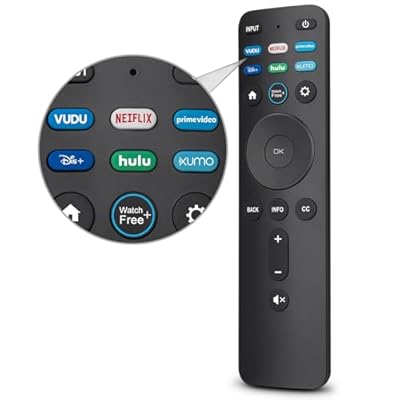
Universal Remote Replacement XRT260 for All VIZIO Smart TV Smartcast 4K P-Series V-Series D-Series M-Series XRT136 XRT140 , with Buttons for Netflix
Item #:
71257202
MWK 42738
Price Details
Excluding Shipping & Custom charges ( Shipping and custom charges will be calculated on checkout )
*All items will import from US
0 ratings
Write a review
In stock
 Imported from USA store
QTY:
Order now and get it around Wednesday, July 15
Secured transaction
Ubuy works hard to protect your security and privacy. Our advanced payment security system ensures confidentiality by encrypting your information during transmission using AES (Advanced Encryption Standards) and SSL (Secure Socket Layer) protocols. Your payment details are 100% secure as we do not share your payment details with third party sellers.
Our Top Logistics Partners


Replace your old or damaged remote with the EWO's remote and keep all the functionality of the original remote.

Fast
Shipping

Free
Return*

Secure Packaging

100% Original Products

PCI DSS Compliance

ISO 27001 Certified


Note: Step Down Voltage Transformer required for using electronics products of US store (110-120). Recommended power converters Buy Now.


What Stands Out
Voice Control
Seamlessly navigate your Samsung Smart TV using voice commands, enhancing convenience and accessibility while reducing the need for traditional remotes.
Solar Charging
Environmentally friendly solar charging eliminates the hassle of battery replacements, ensuring your remote is always ready to use while reducing electronic waste.
Universal Compatibility
Designed to work effortlessly with various Samsung Smart TV models, including QLED 4K and 8K Series, providing a reliable replacement remote for a wide audience.
Product Details
| Item Weight | 0.25 lbs (110 grams) |
Who Should Buy?

-
Samsung TV Users
Perfect for users needing a replacement remote for their Samsung Smart TVs or compatible models.
-
Voice Command Lovers
Ideal for tech-savvy individuals who prefer using voice commands for hands-free control of their TV.
-
Eco-Conscious Shoppers
Suitable for environmentally conscious consumers who appreciate the solar-powered features of this remote control.

-
Non-Samsung Devices
Not suitable for users with non-Samsung TVs or incompatible models needing a universal remote.
-
Traditional Remote Users
Individuals who prefer basic remote functionalities rather than advanced features and voice control may not find it suitable.
-
Budget-Conscious Shoppers
Users looking for a very basic and inexpensive remote may find this product too specialized for their needs.
Product Description
Universal Remote Replacement XRT260 for All VIZIO Smart TV Smartcast 4K P-Series V-Series D-Series M-Series XRT136 XRT140 , with Buttons for Netflix Disney Prime Video Hulu No Voice Function
Have any Query? Chat with us
Customer Questions & Answers
-
Question:
What devices are compatible with the Universal Remote Replacement XRT260?
Answer: The Universal Remote Replacement XRT260 is designed to be compatible with a wide range of VIZIO Smart TVs, including the Smartcast models and various series like the 4K P-Series, V-Series, D-Series, M-Series, and others. This ensures that you can easily control your television regardless of the specific model you own, provided it falls under the VIZIO brand. Users often find it helpful in managing multiple devices with one remote, making it a convenient addition to any entertainment setup. -
Question:
How do I set up the XRT260 remote control?
Answer: Setting up the XRT260 remote control is quite straightforward. Typically, you need to insert the batteries into the remote and then press the 'TV' button to switch it on. After that, you can follow the on-screen instructions provided with the remote to pair it with your VIZIO Smart TV. Many users appreciate the simplicity of this process, as it allows them to quickly regain control over their viewing experience without any technical hassle. -
Question:
Does the XRT260 remote have dedicated buttons for streaming services?
Answer: Yes, the XRT260 remote control includes dedicated buttons for popular streaming services, including a prominent button for Netflix. This feature allows users to access their favorite streaming content instantly without navigating through menus. It’s particularly useful for frequent viewers of Netflix, as it enhances convenience and speeds up access to shows and films, making the overall viewing experience much more enjoyable. -
Question:
Is the XRT260 remote backlit?
Answer: The XRT260 remote does not feature backlighting. While this might be a consideration for some users looking for ease of use in low-light conditions, many find that the design and layout of the buttons are intuitive enough to use even in dim environments. People often adapt quickly and appreciate the functional design of the remote, which emphasizes direct access to key controls, including volume and channel buttons. -
Question:
Can the XRT260 remote control other devices apart from VIZIO TVs?
Answer: The primary function of the XRT260 remote is to control VIZIO Smart TVs. However, depending on the model, it may also be programmed to work with other devices, such as soundbars or Blu-ray players, particularly if they are compatible with VIZIO products. Users often experiment with programming the remote to streamline control of multiple devices, enhancing their home entertainment setup. -
Question:
What is the range of the XRT260 remote control?
Answer: The XRT260 remote control typically operates effectively within a range of about 30 feet. This range allows you to comfortably control your VIZIO Smart TV from various locations in the room without losing functionality. Users enjoy the flexibility this range provides, whether they are sitting on the couch or simply moving around their living space while still being able to change channels or adjust volume. -
Question:
How do I troubleshoot common issues with the XRT260 remote?
Answer: If you encounter issues with the XRT260 remote, such as unresponsive buttons or pairing problems, a few troubleshooting steps can help. Firstly, ensure that the batteries are functioning and properly installed. If problems persist, try resetting the remote by removing the batteries and re-inserting them after a few seconds. Users commonly find these simple fixes effective in restoring their remote's functionality and enhancing their overall user experience. -
Question:
What features set the XRT260 remote apart from other remotes?
Answer: The XRT260 remote stands out due to its user-friendly design and dedicated buttons for popular streaming services like Netflix. This focus on accessibility allows users to quickly and easily access their favorite content without navigating through multiple menus. Furthermore, its compatibility with a wide range of VIZIO Smart TVs ensures that users can enjoy a seamless experience across devices, making it a preferred choice among many viewers. -
Question:
How do I clean and maintain my XRT260 remote?
Answer: Keeping the XRT260 remote clean is essential for optimal function. Regularly wipe the surface with a soft, damp cloth to remove dust and grime. For deeper cleaning, you can use a small amount of isopropyl alcohol on a cotton swab to clean around the buttons. Many users find that taking this extra care enhances durability and keeps the remote looking brand new, prolonging its usability in the long run. -
Question:
Where can I buy the Universal Remote Replacement XRT260 in Malawi?
Answer: You can purchase the Universal Remote Replacement XRT260 for all VIZIO Smart TVs at Ubuy in Malawi. Ubuy offers a straightforward shopping experience, ensuring that you can easily find and acquire this remote for seamless television control. Given its popularity and compatibility features, buying from Ubuy guarantees you have a reliable source for enhancing your viewing experience.
EWO'S Remote Controls Editorial Review
No editorial reviews found
Customer Reviews & Ratings
1 customers ratings
-
5 Star
0%
-
4 Star
100%
-
3 Star
0%
-
2 Star
0%
-
1 Star
0%
Review this product
Share your thoughts with other customers
Platform Trust & Buyer Confidence

MT
Mohd
Verified buyer
“The product received very good packaging & safe…Thank You”
16 June 2026 · via Trustpilot
SJ
Shawati
Verified buyer
“Accurate delivery timing given”
16 June 2026 · via Trustpilot
YB
Youcef
Verified buyer
“Not madly expensive like I thought, and much quicker than promised.”
15 June 2026 · via Trustpilot
LM
Leila
Verified buyer
“Never dealt with Ubuy before, but everything worked out great. Seamless cross border purchasing and shipping. Thanks!”
6/7/2026 · via Trustpilot
KA
Kwame
Verified buyer
“The process was smooth, with clear communication and timelines. This was my 1st purchase and I am really impressed. I will definitely be coming back.”
12 June 2026 · via Trustpilot
Secure Checkout
Global Delivery
Easy Returns
Genuine Products
Product Price History
Important information
- Limitations : For products shipped internationally, please note that any manufacturer warranty may not be valid; manufacturer service options may not be available; product manuals, instructions, and safety warnings may not be in destination country languages; the products (and accompanying materials) may not be designed in accordance with destination country standards, specifications, and labeling requirements; and the products may not conform to destination country voltage and other electrical standards (requiring use of an adapter or converter if appropriate). The recipient is responsible for assuring that the product can be lawfully imported to the destination country. When ordering from Ubuy or its affiliates, the recipient is the importer of record and must comply with all laws and regulations of the destination country.
- Not all the products listed on Ubuy are for sale, as Ubuy is a global search engine. Products are subject to export/trade regulations.
MWK 42738
Order now and get it around Wednesday, July 15
This item is not restrict in my country.(Please click on above link if this item is not restrict in your country, So our team will review and allow.)
QTY:
Secured transaction
PCI DSS compliant and ISO 27001:2022 certified, with encrypted payments and full buyer protection on every order.
Our Top Logistics Partners
Fastest cross-border delivery
Features & Benefits
- Greater transmitting distance (over 50 ft) and stable performance
- 7 shortcut buttons for popular streaming platforms
- Compatible with all VIZIO Smart TV models
- No programming or setup required
- Uses two 1.5V AAA batteries (not included)
- No voice function, replaced by INFO buttons
Ubuy Assurance
Experience worry-free shopping with 100% original products, PCI DSS-compliant payment security, ISO 27001-certified data protection, the fastest cross-border delivery, free returns *, and secure packaging on every order.