



0 ratings
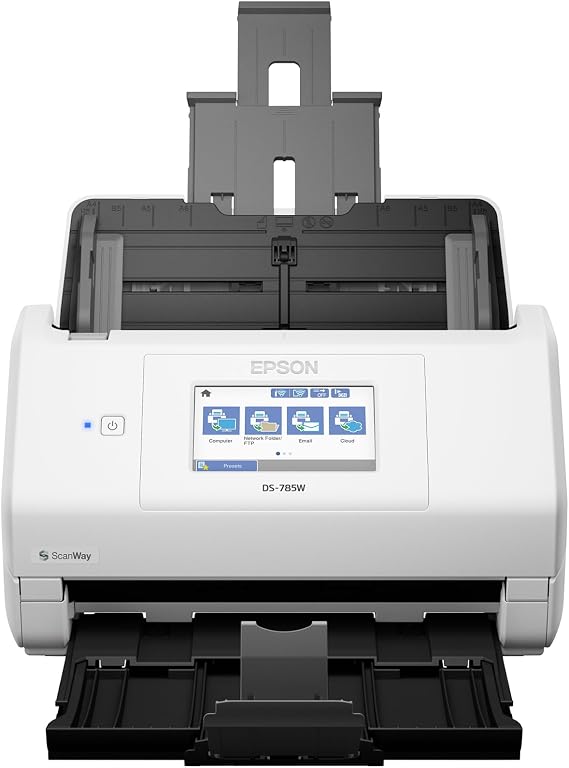
Epson DS-785W Color Duplex Desktop Document Scanner, up to 45 ppm, Wireless/USB Connectivity, ScanWay PC-Free Scanning, 4.3 LCD Touchscreen, 100-Page Auto Document Feeder (ADF), Twain/ISIS Drivers
Fast scan speeds: up to 35 ppm/70 ipm (1); 1-pass duplex scanning.
Epson DS-785W Color Duplex Desktop Document Scanner, up to 45 ppm, Wireless/USB Connectivity, ScanWay PC-Free Scanning, 4.3" LCD Touchscreen, 100-Page Auto Document Feeder (ADF), Twain/ISIS Drivers
Item #: 38106049

Epson DS-785W Color Duplex Desktop Document Scanner, up to 45 ppm, Wireless/USB Connectivity, ScanWay PC-Free Scanning, 4.3" LCD Touchscreen,

Item #: 38106049
0 ratings Write a review
Out of stock
us Imported from USA store
Our Top Logistics Partners
  • fedex
  • dhl
Fast scan speeds: up to 35 ppm/70 ipm (1); 1-pass duplex scanning.
U-Care Warranty:
None
Select a Plan
fast shipping

Fast
Shipping

free return

Free
Return*

secure packaging

Secure Packaging

100% original products

100% Original Products

pci-dss

PCI DSS Compliance

iso certified

ISO 27001 Certified


paypal payment
visa payment
mastercard payment
Note: Step Down Voltage Transformer required for using electronics products of US store (110-120). Recommended power converters Buy Now.

What Stands Out

Wireless Connectivity
Streamline your document scanning process with seamless wireless connectivity, enabling users to scan directly to their devices without the clutter of cables.
High-Speed Duplex Scanning
Enjoy efficient scanning with the 50-page ADF, allowing for fast, double-sided scans that save time and enhance productivity for both home and office use.
Versatile Compatibility
Compatible with both PC and Mac, along with Twain and ISIS drivers, ensuring that the scanner fits easily into any workflow or system environment.

Product Details

Shop Epson DS-785W Color Duplex Desktop Document Scanner, up to 45 ppm, Wireless/USB Connectivity, ScanWay PC-Free Scanning, 4.3 LCD Touchscreen, 100-Page Auto Document Feeder (ADF), Twain/ISIS Drivers online at a best price in Malawi. B09BQYJKQH
Scanner TypeDocument
Connection TypeUSB, Wi-Fi
Resolution600 dpi
Wattage14 watts
Color Depth30-bit input/24-bit output bits (76.2 cm)
Standard Sheet Capacity100
Optical Sensor TechnologyCIS
Greyscale Depth10-bit
Media TypeUSB
Item Dimensions D x W x H6.7"D x 11.6"W x 6.9"H (17 x 29.5 x 17.5 cm)
Item Weight8.2 pounds (3.72 kg)
BrandEpson
Model NameDS-785W
UPC198390012434
Unit Count1 Count
ManufacturerEpson
Connectivity TechnologyUSB, Wi-Fi
Product Dimensions (L x W x H)6.7"D x 11.6"W x 6.9"H (17 x 29.5 x 17.5 cm)

Who Should Buy?

Suitable For
  • Busy Professionals

    Ideal for professionals needing quick, efficient scanning of documents without sacrificing quality in a high-volume environment.

  • Home Offices

    Perfect for home office setups looking to digitize paperwork, enhancing organization and reducing clutter with minimal effort.

  • Students and Researchers

    Students can easily scan numerous pages for research purposes, aiding in organization and accessibility of reference materials.

Not Suitable For
  • Casual Users

    Occasional users may find the advanced features unnecessary, making simpler and cheaper options more suitable for their needs.

Product Description

Epson DS-785W Color Duplex Desktop Document Scanner, up to 45 ppm, Wireless/USB Connectivity, ScanWay PC-Free Scanning, 4.3" LCD Touchscreen, 100-Page Auto Document Feeder (ADF), Twain/ISIS Drivers

Have any Query? Chat with us

Customer Questions & Answers

  • Question: What are the main features of the Epson DS-575W II scanner?

    Answer: The Epson DS-575W II scanner boasts wireless connectivity, enabling easy document scanning from your PC or Mac. Key features include color duplex scanning, a 50-page Auto Document Feeder (ADF), and compatibility with TWAIN and ISIS drivers. This makes it suitable for various applications, like digitizing documents, receipts, or photos without hassle. Whether in an office or home setting, you can streamline your workflow efficiently.
  • Question: How does wireless connectivity work with the Epson DS-575W II?

    Answer: The Epson DS-575W II utilizes Wi-Fi Direct technology, allowing you to connect the scanner to your computer or mobile device without the need for a network. This feature simplifies the scanning process, especially in environments with multiple users, as it avoids the hassle of wired connections. For instance, office staff can easily connect and scan documents even from different rooms, enhancing productivity.
  • Question: Is the Epson DS-575W II compatible with both PC and Mac?

    Answer: Yes, the Epson DS-575W II is designed for compatibility with both PC and Mac systems. This versatility ensures that users across different platforms can utilize the scanner seamlessly. Whether you are an Apple user or prefer Windows, you can take advantage of its features without needing separate drivers, making your setup process straightforward.
  • Question: What type of documents can I scan with the Epson DS-575W II?

    Answer: The Epson DS-575W II can scan various document types, including standard paper, receipts, business cards, and even photos. Its duplex capability allows for scanning both sides of a document simultaneously, promoting efficiency. This makes it an ideal choice for professionals looking to digitize documents quickly, such as in accounting, administration, or other office environments.
  • Question: How do I set up the Epson DS-575W II for the first time?

    Answer: Setting up the Epson DS-575W II involves a few straightforward steps. First, connect the scanner to a power source and install the necessary drivers on your computer from the Epson website or included CD. Then, connect it to your Wi-Fi network. Once connected, you can start scanning. For mobile users, downloading the Epson Smart app allows for wireless scanning directly from smartphones or tablets.
  • Question: What is the speed of the Epson DS-575W II scanner?

    Answer: The Epson DS-575W II offers high-speed scanning, reaching up to 35 pages per minute (ppm) for single-sided documents and up to 70 images per minute (ipm) for duplex. This speed is particularly beneficial for businesses that require mass scanning of documents, allowing you to handle large volumes quickly without sacrificing quality.
  • Question: Can the scanner automatically straighten documents?

    Answer: Yes, the Epson DS-575W II features an automatic document skew correction function. This ensures that scanned images are straightened once processed, eliminating the need for manual adjustments. This capability is especially useful when scanning multiple documents, such as contracts or reports, maintaining a professional appearance in the digital files.
  • Question: What scanning software does the Epson DS-575W II support?

    Answer: The Epson DS-575W II supports various scanning software, including Epson Scan 2, which offers enhanced features like OCR (Optical Character Recognition) to convert scanned documents into editable text. Additionally, it works with TWAIN and ISIS drivers for integration with professional document management systems, making it suitable for businesses requiring organized digital archiving.
  • Question: How does the Auto Document Feeder (ADF) work?

    Answer: The 50-page Auto Document Feeder (ADF) on the Epson DS-575W II allows users to load multiple pages at once, facilitating batch scanning. Once loaded, the scanner will automatically feed the documents, scanning each page efficiently. This feature is invaluable for busy work environments where time savings can lead to increased productivity, allowing you to scan large reports or stacks of receipts rapidly.
  • Question: Where can I buy the Epson DS-575W II Wireless Scanner?

    Answer: You can purchase the Epson DS-575W II Wireless Color Duplex Document Scanner on Ubuy. Ubuy offers a convenient platform that often includes updated inventories, making it easy to find this product. Plus, you can benefit from additional features like detailed product descriptions and customer reviews that assist you in making an informed decision.

Epson Document Scanners Editorial Review

The Epson DS-575W II is a wireless color duplex document scanner that comes with a 50-page auto document feeder ADF, Twain and ISIS drivers, and Epson Smart Panel Mobile App. The device lets you save scanned documents as searchable PDFs that can be found by searching for words in the documents. It can be used wirelessly with up to four computers/devices or connected with the Network Interface Unit for sharing over a network. The scanner scans documents from 2-inch receipts to 8.5 x 14 inches. Most customers who reviewed this product were pleased with their purchase. They appreciated the scanner's speed and efficiency and noted that it was relatively easy to set up. Some customers noted that this scanner was ten times faster than their previous machines, and others said that it replaced a much older Epson scanner. However, some customers experienced issues with error messages and updates that hung during installation. One customer also noted that it required "Admin" rights to access the scanner on a domain network, which caused some inconvenience.

Customer Reviews & Ratings

1 customers ratings
  • 5 Star
    100%
  • 4 Star
    0%
  • 3 Star
    0%
  • 2 Star
    0%
  • 1 Star
    0%

Review this product

Share your thoughts with other customers

Pros

  • Fast and efficient scanner
  • Scans both sides of the document
  • Can save scanned documents as searchable PDFs

Cons

  • Some customers experienced error messages during scanning

Platform Trust & Buyer Confidence

trustpilot logo
4.2/5 9250 + reviews
Read reviews
MA
Mohammad
Verified buyer

“Excellent quality and original too,when ubuy send original things I will appreciate that ,I very satisfied thank you”

23 July 2026 · via Trustpilot
CK
Chitra
Verified buyer

“The order and delivery progress was communicated very well. Package arrived within the estimated time. Products arrived as expected in good condition.”

22-Jul-26 · via Trustpilot
K
kund
Verified buyer

“Good supply of products. Safe payment methods, and shipment worldwide! Genuine products.”

23-Jul-26 · via Trustpilot
OO
Onesi
Verified buyer

“Was my first time buying a product from Ubuy, but I found it so helpful. This is reliable. Gonna place a new order!”

22 July 2026 · via Trustpilot
SJ
SAO JOHN
Verified buyer

“Ubuy is a great online platform to buy stuff. Reliable, fast delivery time and great value for money. I've been using Ubuy online shopping platform for three years now and will continue to do so.”

23 July 2026 · via Trustpilot
Secure Checkout Global Delivery Easy Returns Genuine Products

Important information

  • Limitations : For products shipped internationally, please note that any manufacturer warranty may not be valid; manufacturer service options may not be available; product manuals, instructions, and safety warnings may not be in destination country languages; the products (and accompanying materials) may not be designed in accordance with destination country standards, specifications, and labeling requirements; and the products may not conform to destination country voltage and other electrical standards (requiring use of an adapter or converter if appropriate). The recipient is responsible for assuring that the product can be lawfully imported to the destination country. When ordering from Ubuy or its affiliates, the recipient is the importer of record and must comply with all laws and regulations of the destination country.
  • Not all the products listed on Ubuy are for sale, as Ubuy is a global search engine. Products are subject to export/trade regulations.