0 ratings
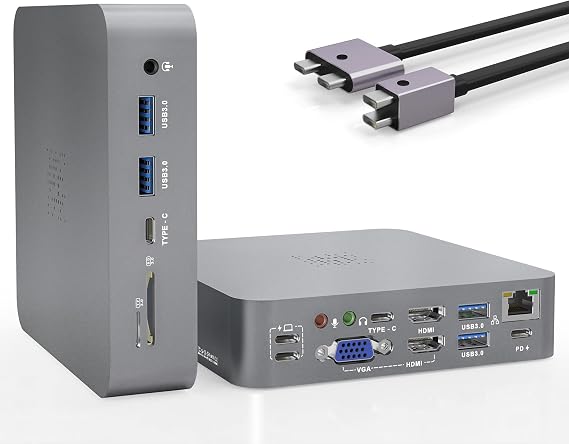
MacBook Pro Docking Station, Triple Display with Dual HDMI+VGA, 1000Mb/s Ethernet, 100W PD, USB-C 3.1 x2+USB 3.0 x4, Audio/Mic, SD/TF, Aluminum, macOS Compatible
Item #: 42001199

MacBook Pro Docking Station, Triple Display with Dual HDMI+VGA, 1000Mb/s Ethernet, 100W PD, USB-C 3.1 x2+USB 3.0 x4, Audio/Mic, SD/TF, Aluminum,

Item #: 42001199
0 ratings Write a review
Out of stock
us Imported from USA store
Our Top Logistics Partners
  • fedex
  • dhl
U-Care Warranty:
None
Select a Plan
fast shipping

Fast
Shipping

free return

Free
Return*

secure packaging

Secure Packaging

100% original products

100% Original Products

pci-dss

PCI DSS Compliance

iso certified

ISO 27001 Certified


paypal payment
visa payment
mastercard payment
Note: Step Down Voltage Transformer required for using electronics products of US store (110-120). Recommended power converters Buy Now.

What Stands Out

Triple Display Support
Seamlessly connect up to three monitors through dual HDMI and VGA outputs, enhancing productivity and multitasking capabilities for professionals and creatives alike.
Power Delivery
Experience fast charging with 100W Power Delivery, ensuring your MacBook Pro stays powered throughout the day while you work on demanding tasks.
Multiple Connections
Equipped with a variety of ports, including USB-C 3.1, USB 3.0, and SD/TF slots, this docking station offers versatile connectivity for all your peripherals and multimedia devices.

Product Details

Shop MacBook Pro Docking Station, Triple Display with Dual HDMI+VGA, 1000Mb/s Ethernet, 100W PD, USB-C 3.1 x2+USB 3.0 x4, Audio/Mic, SD/TF, Aluminum, macOS Compatible online at a best price in Malawi. B099DMN4DH
Item Weight1.5 lbs (680 grams)

Who Should Buy?

Suitable For
  • Creative Professionals

    Ideal for graphic designers and video editors who require multiple displays for enhanced productivity and creativity.

  • Remote Workers

    Perfect for remote workers needing a stable internet connection and various ports for connecting peripherals.

  • Tech Enthusiasts

    Great for users who appreciate high-speed data transfer and extensive connectivity options for multiple devices.

Not Suitable For
  • Casual Users

    Inadequate for users who only need basic connectivity without the need for advanced features and multiple displays.

  • Budget-Conscious Users

    Not suitable for those seeking affordable alternatives, as this product may be pricier than simpler docks.

  • Traveling Professionals

    Less ideal for frequent travelers due to its bulkiness compared to more portable docking solutions.

Product Description

MacBook Pro Docking Station, Triple Display with Dual HDMI+VGA, 1000Mb/s Ethernet, 100W PD, USB-C 3.1 x2+USB 3.0 x4, Audio/Mic, SD/TF, Aluminum, macOS Compatible

Have any Query? Chat with us

Customer Questions & Answers

  • Question: What is the primary function of the MacBook Pro Hub Docking Station?

    Answer: The MacBook Pro Hub Docking Station primarily serves to expand the connectivity options of your MacBook Pro, allowing users to connect multiple devices simultaneously. This hub supports triple display setups with dual HDMI and VGA outputs, making it perfect for professionals who need enhanced workspace management. For instance, designers can benefit from having multiple monitors for multitasking, or business professionals can effortlessly run presentations from different sources.
  • Question: How many USB ports does the MacBook Pro Hub offer?

    Answer: The MacBook Pro Hub Docking Station provides a total of six USB ports: two USB-C 3.1 ports and four USB 3.0 ports. This extensive range of ports allows users to connect various devices such as external hard drives, flash drives, printers, and more. For example, a photographer can quickly transfer large files from a camera to the computer while simultaneously using an external drive for storage.
  • Question: What type of video output does this docking station support?

    Answer: This docking station supports dual HDMI outputs and one VGA output, enabling users to set up triple displays from their MacBook Pro. This is particularly beneficial for individuals in creative industries, such as video editing or graphic design, where having multiple screens can significantly enhance productivity. Additionally, users can connect projectors or additional monitors for varied display needs during presentations.
  • Question: Does the hub support power delivery, and if so, how much?

    Answer: Yes, the MacBook Pro Hub Docking Station supports 100W Power Delivery (PD). This feature allows you to charge your MacBook Pro while using the docking station, ensuring that it remains powered throughout your workday. For instance, if you're working on a long project in a café, you can connect the hub, charge your device, and also access your peripherals without the worry of battery drain.
  • Question: Is the MacBook Pro Hub compatible with other laptops?

    Answer: The MacBook Pro Hub Docking Station is primarily designed for MacBook Pro models, but it is also compatible with other laptops that have USB-C ports. This versatility makes it a valuable accessory for users with various devices. For example, individuals who use both a MacBook and a USB-C compatible Windows laptop can seamlessly switch between devices using the same docking station.
  • Question: What is the maximum internet speed supported by the RJ45 port?

    Answer: The RJ45 port on the MacBook Pro Hub Docking Station supports speeds up to 1000Mbps. This high-speed Ethernet connectivity is perfect for users who require stable and fast internet connections for tasks like video conferencing, online gaming, or large file downloads. Using a wired connection can provide a significant advantage over Wi-Fi, particularly in environments with unstable wireless service.
  • Question: Does the hub have an audio output for speakers or microphones?

    Answer: Yes, the MacBook Pro Hub Docking Station includes dedicated audio and microphone ports. This is particularly useful for users who need to connect headphones, speakers, or external microphones for video calls or media playback. For example, during online meetings, you can use high-quality headphones connected to the hub for better audio clarity, enhancing your communication experience.
  • Question: What types of use cases are ideal for the MacBook Pro Hub Docking Station?

    Answer: The MacBook Pro Hub Docking Station is ideal for a variety of use cases, including remote work, multimedia production, and gaming. For remote professionals, it facilitates connecting multiple devices and displays for improved productivity. Creative professionals can use it to manage extensive editing setups, while gamers can leverage multi-display setups for immersive experiences. Essentially, it's designed for anyone seeking to maximize their workspace efficiency.
  • Question: Can I connect external storage devices to the docking station?

    Answer: Absolutely! The MacBook Pro Hub Docking Station supports external storage devices via its USB ports. With four USB 3.0 and two USB-C 3.1 ports available, you can easily connect external hard drives or SSDs for quick file transfers and backups. This feature is particularly useful for content creators and businesses needing to manage large volumes of data efficiently.
  • Question: Where can I buy the MacBook Pro Hub Docking Station?

    Answer: You can purchase the MacBook Pro Hub Docking Station from Ubuy in Malawi. Ubuy offers a variety of tech accessories and is a reliable platform for finding this docking station. You’ll enjoy a smooth purchasing process and access to detailed product information, helping you make an informed choice for your connectivity needs.

Arkidyn USB Hubs Editorial Review

No editorial reviews found

Customer Reviews & Ratings

4.0
1 customers ratings
  • 5 Star
    0%
  • 4 Star
    100%
  • 3 Star
    0%
  • 2 Star
    0%
  • 1 Star
    0%

Review this product

Share your thoughts with other customers

Platform Trust & Buyer Confidence

trustpilot logo
4.3/5 9,000 + reviews
Read reviews
MT
Mohd
Verified buyer

“The product received very good packaging & safe…Thank You”

16 June 2026 · via Trustpilot
SJ
Shawati
Verified buyer

“Accurate delivery timing given”

16 June 2026 · via Trustpilot
YB
Youcef
Verified buyer

“Not madly expensive like I thought, and much quicker than promised.”

15 June 2026 · via Trustpilot
LM
Leila
Verified buyer

“Never dealt with Ubuy before, but everything worked out great. Seamless cross border purchasing and shipping. Thanks!”

6/7/2026 · via Trustpilot
KA
Kwame
Verified buyer

“The process was smooth, with clear communication and timelines. This was my 1st purchase and I am really impressed. I will definitely be coming back.”

12 June 2026 · via Trustpilot
Secure Checkout Global Delivery Easy Returns Genuine Products

Product Price History

Important information

  • Limitations : For products shipped internationally, please note that any manufacturer warranty may not be valid; manufacturer service options may not be available; product manuals, instructions, and safety warnings may not be in destination country languages; the products (and accompanying materials) may not be designed in accordance with destination country standards, specifications, and labeling requirements; and the products may not conform to destination country voltage and other electrical standards (requiring use of an adapter or converter if appropriate). The recipient is responsible for assuring that the product can be lawfully imported to the destination country. When ordering from Ubuy or its affiliates, the recipient is the importer of record and must comply with all laws and regulations of the destination country.
  • Not all the products listed on Ubuy are for sale, as Ubuy is a global search engine. Products are subject to export/trade regulations.