- Home Page /
- Electronics /
- Computer Accessories /
- Computer Accessories & Peripherals /
- Input Devices /
- Graphics Tablets /
- Drawing Tablet, UGEE M708 10 x 6 inch Large D...
0 ratings

Item #:
13703515
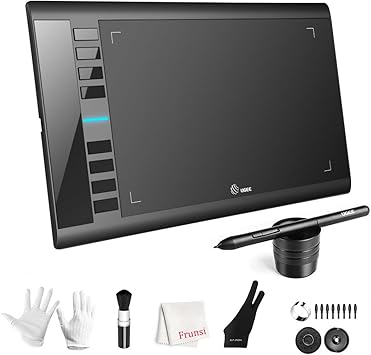
Drawing Tablet, UGEE M708 10 x 6 inch Large Drawing Tablet with 8 Hot Keys, Passive Stylus of 16384 Levels Pressure, Digital Graphics Art Tablet for
Item #:
13703515
MWK 160412
Price Details
Excluding Shipping & Custom charges ( Shipping and custom charges will be calculated on checkout )
*All items will import from US
0 ratings
Write a review
In stock
 Imported from USA store
QTY:
Order now and get it around Wednesday, July 15
Secured transaction
Ubuy works hard to protect your security and privacy. Our advanced payment security system ensures confidentiality by encrypting your information during transmission using AES (Advanced Encryption Standards) and SSL (Secure Socket Layer) protocols. Your payment details are 100% secure as we do not share your payment details with third party sellers.
Our Top Logistics Partners


UGEE M708 offers no-lag sketch, painting experience and 8192 levels of pressure sensitivity for perfect artistry design.

Fast
Shipping

Free
Return*

Secure Packaging

100% Original Products

PCI DSS Compliance

ISO 27001 Certified


Note: Step Down Voltage Transformer required for using electronics products of US store (110-120). Recommended power converters Buy Now.


What Stands Out
Large Drawing Area
The UGEE M708 features a spacious 10 x 6 inch drawing surface, giving artists ample space for detailed art creation and sketches, which enhances creativity and comfort during long drawing sessions.
High Pressure Sensitivity
Equipped with an impressive 8192 levels of pressure sensitivity, the tablet allows for precise control over line thickness and opacity, ensuring a natural drawing experience for both beginners and professionals.
Customizable Hot Keys
The inclusion of 8 customizable hot keys improves workflow efficiency by allowing quick access to frequently used functions, adapting the tablet to individual user preferences for a seamless creative process.
Product Details
- Large 10 x 6 inch Active Drawing Space with papery texture surface for smooth digital artwork creation
- 8192 Levels Pressure Sensitivity passive stylus technology for accurate and varied line drawing
- Compatible with Windows and Mac OS, and creative software like Photoshop, Illustrator, and more
- Ergonomically designed 8 customizable express keys for shortcut functions and productivity improvement
- 266 RPS Report Rate for smooth real-time painting experience, suitable for both right and left-handed users
- Multi-scene Application for various art forms such as sketching, design, and online education
| Package Weight | 6.51 Pound |
Dangerous Goods
To avoid the delay in customs clearance process for Dangerous Goods, the shipment shall be opened at our warehouse facility to check the severity of hazardous components. Please see the list of Dangerous goods here.
Who Should Buy?

-
Aspiring Artists
Perfect for beginners looking to explore digital art with a user-friendly interface and responsive stylus.
-
Graphic Designers
Ideal for professionals who require precision and pressure sensitivity to create detailed designs and illustrations.
-
Students
Great for educational purposes, allowing art and design students to practice and enhance their creative skills digitally.

-
Advanced Users
Experienced artists may find limitations in features compared to more professional-grade tablets available on the market.
-
Mobile Users
Not suitable for those who prefer portability, as the tablet needs a fixed connection to a computer.
-
Non-Artists
Individuals who do not engage in drawing or design work may not benefit from owning this graphics tablet.
Product Description
Drawing Tablet, UGEE M708 10 x 6 inch Large Drawing Tablet with 8 Hot Keys, Passive Stylus of 16384 Levels Pressure, Digital Graphics Art Tablet for PC Paint, Design, Art Creation Sketch
Have any Query? Chat with us
Customer Questions & Answers
-
Question:
What makes the UGEE M708 Drawing Tablet suitable for artists?
Answer: The UGEE M708 Drawing Tablet is designed specifically for artists and designers, offering a large 10 x 6 inch working area. This spacious surface allows for ample room to create without feeling restricted. The tablet features 8192 levels of pressure sensitivity, which means it can capture even the most subtle variations in your strokes. Whether you are sketching, painting, or editing photos, this tablet provides the precision and responsiveness that artists need. Additionally, the inclusion of 8 customizable hot keys enhances your workflow by allowing quick access to your most-used functions. -
Question:
How does the pressure sensitivity of the UGEE M708 enhance drawing experience?
Answer: The UGEE M708 features an impressive 8192 levels of pressure sensitivity, allowing artists to control line thickness and opacity simply by varying the pressure applied with the stylus. This level of sensitivity mimics traditional tools like pencils or brushes, making it easier to create natural-looking artwork. Whether you’re creating delicate lines or bold strokes, the tablet responds dynamically, offering an intuitive drawing experience. Artists can explore a wide range of techniques, from detailed illustrations to broad strokes, making this tablet versatile for all art styles. -
Question:
What software is compatible with the UGEE M708 Drawing Tablet?
Answer: The UGEE M708 Drawing Tablet is compatible with a multitude of creative applications, including industry standards like Adobe Photoshop, CorelDRAW, and Clip Studio Paint. This versatility allows users to utilize the tablet for various creative projects, whether graphic design, digital art, or digital animation. Setting up the tablet with your preferred software is typically straightforward, thanks to its driver compatibility. Therefore, whether you're a professional artist or a hobbyist, you can easily integrate the UGEE M708 into your existing workflow. -
Question:
Can beginners use the UGEE M708 Drawing Tablet?
Answer: Absolutely! The UGEE M708 Drawing Tablet is an excellent choice for beginners due to its user-friendly design and intuitive features. The pressure-sensitive stylus allows new users to learn and experiment with digital drawing techniques without the intimidation factor. With its customizable hot keys, beginners can set up shortcuts for commonly used tools, streamlining their learning process. Additionally, many online tutorials and classes cater specifically to beginners using UGEE tablets, making it easier to enhance your skills. -
Question:
What are the advantages of using a passive stylus with the UGEE M708?
Answer: The UGEE M708 comes with a passive stylus, which means it does not require batteries, offering a hassle-free drawing experience. This design reduces the need for frequent replacements and charging, allowing for uninterrupted creativity. Passive styluses provide impressive sensitivity and responsiveness, ensuring that every stroke and detail is accurately captured. For artists, this translates to a smoother workflow, as they can focus entirely on their creative process without technical distractions. -
Question:
How can I customize the hot keys on the UGEE M708 Drawing Tablet?
Answer: Customizing the hot keys on the UGEE M708 Drawing Tablet is straightforward and can be done through the tablet's driver software. Once installed on your computer, you can assign specific functions or shortcuts to the 8 hot keys according to your preferred workflow. This is particularly useful for artists who frequently switch between tools, as it allows for more efficient use of the tablet during creative sessions. Users can set keys for commonly used actions such as undo, redo, or specific brush types, enhancing their overall productivity. -
Question:
What types of projects are best suited for the UGEE M708 Drawing Tablet?
Answer: The UGEE M708 Drawing Tablet is versatile and well-suited for a variety of projects, including digital painting, graphic design, photo editing, and animation. Artists can use it to create illustrations, designs, and even detailed concept art. Additionally, it is an excellent tool for beginners learning about digital art techniques or students working on art assignments. Whether you're crafting intricate illustrations or sketching quick concepts, the tablet adapts to different styles and techniques, making it a valuable asset in any creative toolkit. -
Question:
What is included in the UGEE M708 tablet package?
Answer: The UGEE M708 tablet package typically includes the drawing tablet itself, a passive stylus, replacement nibs, a pen holder, and the necessary software drivers for installation. The stylus comes with pressure sensitivity and does not require a battery, enhancing convenience for the user. Additionally, the package usually contains a user manual, which provides setup instructions and tips on how to get started. This comprehensive offering ensures users have everything they need to start their creative journey right out of the box. -
Question:
How do I maintain my UGEE M708 Drawing Tablet?
Answer: Maintaining your UGEE M708 Drawing Tablet is simple to ensure its longevity. Regularly clean the surface with a soft, dry cloth to remove dust and fingerprints, and avoid using harsh chemicals that could damage the tablet. Additionally, keep the stylus tip in good condition; replace it as needed to maintain smooth drawing performance. Paying attention to proper storage—avoiding extreme temperatures and keeping it away from moisture—will also help prolong the lifespan of your device. -
Question:
Where can I buy the UGEE M708 Graphics Drawing Tablet in Malawi?
Answer: You can conveniently purchase the UGEE M708 Graphics Drawing Tablet on Ubuy, a trusted e-commerce platform that specializes in a wide range of products including electronics and tech gadgets. Ubuy offers an easy shopping experience, helping you find the UGEE M708 along with various features and specifications. With user-friendly navigation and detailed product descriptions, Ubuy is an excellent choice for obtaining your drawing tablet in Malawi.
UGEE Graphics Tablets Editorial Review
No editorial reviews found
Customer Reviews & Ratings
1 customers ratings
-
5 Star
100%
-
4 Star
0%
-
3 Star
0%
-
2 Star
0%
-
1 Star
0%
Review this product
Share your thoughts with other customers
Platform Trust & Buyer Confidence

MT
Mohd
Verified buyer
“The product received very good packaging & safe…Thank You”
16 June 2026 · via Trustpilot
SJ
Shawati
Verified buyer
“Accurate delivery timing given”
16 June 2026 · via Trustpilot
YB
Youcef
Verified buyer
“Not madly expensive like I thought, and much quicker than promised.”
15 June 2026 · via Trustpilot
LM
Leila
Verified buyer
“Never dealt with Ubuy before, but everything worked out great. Seamless cross border purchasing and shipping. Thanks!”
6/7/2026 · via Trustpilot
KA
Kwame
Verified buyer
“The process was smooth, with clear communication and timelines. This was my 1st purchase and I am really impressed. I will definitely be coming back.”
12 June 2026 · via Trustpilot
Secure Checkout
Global Delivery
Easy Returns
Genuine Products
Product Price History
Important information
- Limitations : For products shipped internationally, please note that any manufacturer warranty may not be valid; manufacturer service options may not be available; product manuals, instructions, and safety warnings may not be in destination country languages; the products (and accompanying materials) may not be designed in accordance with destination country standards, specifications, and labeling requirements; and the products may not conform to destination country voltage and other electrical standards (requiring use of an adapter or converter if appropriate). The recipient is responsible for assuring that the product can be lawfully imported to the destination country. When ordering from Ubuy or its affiliates, the recipient is the importer of record and must comply with all laws and regulations of the destination country.
- Not all the products listed on Ubuy are for sale, as Ubuy is a global search engine. Products are subject to export/trade regulations.
MWK 160412
Order now and get it around Wednesday, July 15
This item is not restrict in my country.(Please click on above link if this item is not restrict in your country, So our team will review and allow.)
QTY:
Secured transaction
PCI DSS compliant and ISO 27001:2022 certified, with encrypted payments and full buyer protection on every order.
Our Top Logistics Partners
Fastest cross-border delivery
Features & Benefits
- Large 10 x 6 inch active drawing space with papery texture surface
- 8192 levels of pressure sensitivity
- Compatible with Windows and Mac OS as well as various creative software
- 8 customizable express keys for short cuts like eraser, zoom in and out, scrolling and undo
- Improves productivity and efficiency when creating with the graphic drawing tablet
Ubuy Assurance
Experience worry-free shopping with 100% original products, PCI DSS-compliant payment security, ISO 27001-certified data protection, the fastest cross-border delivery, free returns *, and secure packaging on every order.