- Home Page /
- Electronics /
- Computer Accessories /
- Computer Accessories & Peripherals /
- Monitor Accessories /
- Monitor Arms /
- HumanCentric Mount Compatible with Dell OptiP...
0 ratings

Item #:
18371700
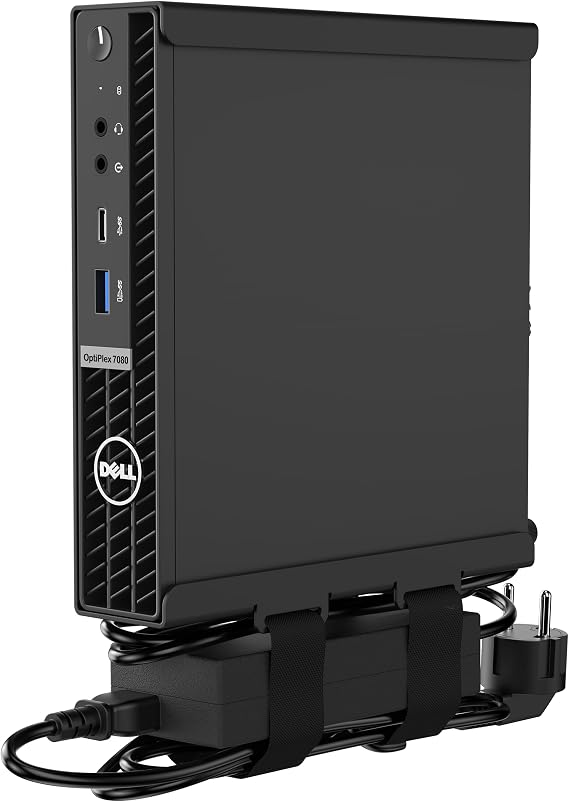
HumanCentric Mount Compatible with Dell OptiPlex Micro Form Factor Case, VESA, Under Desk and Wall Mount Fits MFF 3040, 3046, 3050, 3060, 3070, 3080,
Item #:
18371700
MWK 160859
Price Details
Excluding Shipping & Custom charges ( Shipping and custom charges will be calculated on checkout )
*All items will import from US
0 ratings
Write a review
In stock
 Imported from USA store
QTY:
Order now and get it around Wednesday, July 22
Secured transaction
Ubuy works hard to protect your security and privacy. Our advanced payment security system ensures confidentiality by encrypting your information during transmission using AES (Advanced Encryption Standards) and SSL (Secure Socket Layer) protocols. Your payment details are 100% secure as we do not share your payment details with third party sellers.
Our Top Logistics Partners


Mount your micro OptiPlex to the back of a monitor with ease and keep your cables tidy.

Fast
Shipping

Free
Return*

Secure Packaging

100% Original Products

PCI DSS Compliance

ISO 27001 Certified


Note: Step Down Voltage Transformer required for using electronics products of US store (110-120). Recommended power converters Buy Now.


What Stands Out
Versatile Compatibility
Designed to support various Dell OptiPlex Micro Form Factor models, ensuring seamless integration and versatile mounting options for a diverse range of users and workspaces.
Space-Saving Design
The under desk and wall mount options significantly optimize workspace by freeing up valuable desk area, creating a more organized and clutter-free environment for enhanced productivity.
Durable Construction
Built with high-quality materials, this mount offers exceptional stability and support for your computer, ensuring long-term reliability and peace of mind for users focused on performance.
Product Details
| Brand Name | HumanCentric |
| Model Number | 101-2060 |
| Manufacturer | HumanCentric |
| UPC | 810009090533 |
| Set Name | Dell OptiPlex micro |
| Manufacturer Part Number | 101-2060 |
| Unit Count | 1.0 Count |
| Item Depth | 7.2 inches (18.3 cm) |
| Material Type | Alloy Steel Aluminium |
| Mounting Type | Wall Mount |
| Color | Black |
| Finish Types | Black |
| Brand | HumanCentric |
| Material | Alloy Steel Aluminium |
| Finish Type | Black |
| Package Weight | 2.17 Pound (980 grams) |
Who Should Buy?

-
Office Workers
Ideal for office settings to save desk space and promote a cleaner workspace with an under-desk or wall-mounted setup.
-
Tech Enthusiasts
Perfect for users who like organizing their tech setup neatly and enhancing aesthetics with a cable management solution.
-
Small Business Owners
Great for small businesses needing efficient space utilization by mounting Dell OptiPlex MFF cases without occupying valuable surface area.

-
Home Gamers
Not suitable for gamers needing easy access to their devices, as it restricts direct interaction with mounted hardware.
-
Non-Dell Users
Users with computers outside of the compatible Dell models will find this mount unsuitable for their needs.
-
Heavy Duty Use
Inadequate for environments requiring rugged mounting solutions, such as industrial settings where stronger mounts are needed.
Product Description
HumanCentric Mount Compatible with Dell OptiPlex Micro Form Factor Case, VESA, Under Desk and Wall Mount Fits MFF 3040, 3046, 3050, 3060, 3070, 3080, 5050, 5060, 5070, 7040, 7050, 7060, 7070, More
Have any Query? Chat with us
Customer Questions & Answers
-
Question:
What is the compatibility of the HumanCentric Mount?
Answer: The HumanCentric Mount is specifically designed for Dell OptiPlex Micro Form Factor (MFF) cases including models 3040, 3046, 3050, 3060, 3070, and 3080. This ensures a snug and secure fit that maximizes functionality without compromising accessibility. By choosing a mount explicitly tailored for these models, you can ensure that your hardware remains stable and your workspace remains organized. -
Question:
Can I mount the Dell OptiPlex Micro under my desk?
Answer: Yes, the HumanCentric Mount supports under-desk mounting of Dell OptiPlex Micro Form Factor cases. This setup not only saves valuable desk space but also creates a cleaner and more ergonomic workspace. With the ability to position your computer discreetly beneath the desk, this mount enhances both aesthetic appeal and accessibility, making it easier to access ports and cables. -
Question:
Is installation of the HumanCentric Mount complicated?
Answer: The installation process for the HumanCentric Mount is designed to be user-friendly, with clear instructions provided. Typically, users can mount their Dell OptiPlex Micro securely within minutes. This straightforward installation allows you to quickly achieve a more organized workspace without extensive tools or technical know-how, appealing to both casual users and more tech-savvy individuals. -
Question:
Can I mount the device on a wall?
Answer: Absolutely. The HumanCentric Mount allows for both under-desk and wall mounting, giving you the flexibility to choose your preferred setup. Wall mounting can be especially beneficial in limited spaces, as it provides ample surface area for other items. By elevating your computer off surfaces, you can create a more streamlined and clutter-free environment, which is ideal for home offices or workspaces. -
Question:
What materials is the HumanCentric Mount made from?
Answer: The HumanCentric Mount is constructed from high-quality materials that ensure durability and stability. Typically made from a combination of sturdy steel and secure mounting brackets, it provides a reliable solution for supporting your Dell OptiPlex Micro. This level of construction guarantees that the mount will safely hold your device while withstanding repeated use in dynamic work environments. -
Question:
Does the mount allow for cable management?
Answer: Yes, the design of the HumanCentric Mount includes features that facilitate effective cable management. Users can route cables through designated spaces within the mount, minimizing clutter. This capability is essential for maintaining a professional appearance and ensuring that cables are safely tucked away, reducing the risk of tangles or accidental disconnections during regular use. -
Question:
Will this mount affect the performance of my Dell OptiPlex?
Answer: No, the HumanCentric Mount is designed to support your Dell OptiPlex Micro Form Factor without impacting its performance. By allowing airflow and avoiding obstructive placement, this mount ensures your device operates efficiently. Proper mounting can even enhance performance, as it keeps the device well-ventilated and accessible for maintenance and upgrades. -
Question:
What is the weight capacity of the HumanCentric Mount?
Answer: The HumanCentric Mount is engineered to support the weight of Dell OptiPlex Micro Form Factor cases comfortably. It can accommodate the weight of these devices safely, thus ensuring stability during use. Users can confidently mount their PCs knowing that the sturdy construction is designed to handle the specific weight and dimensions of the OptiPlex models specified. -
Question:
Can I use this mount for other brands besides Dell?
Answer: While the HumanCentric Mount is primarily compatible with Dell OptiPlex Micro Form Factor models, it may also fit other similarly sized devices depending on their dimensions. However, for optimal fit and functionality, it's best to use this mount with the designated Dell OptiPlex units. This specificity prevents potential installation issues and maximizes the performance of your mount. -
Question:
Where can I buy the HumanCentric Mount in Malawi?
Answer: You can purchase the HumanCentric Mount Compatible with Dell OptiPlex Micro Form Factor Case directly from Ubuy in Malawi. Ubuy offers an extensive selection of mounting solutions, ensuring you find the right product for your needs. Their platform makes it straightforward to view product specifications and secure your mount efficiently, enabling an enhanced workplace setup.
HumanCentric Monitor Arms 101-2060 Editorial Review
No editorial reviews found
Customer Reviews & Ratings
1 customers ratings
-
5 Star
100%
-
4 Star
0%
-
3 Star
0%
-
2 Star
0%
-
1 Star
0%
Review this product
Share your thoughts with other customers
Platform Trust & Buyer Confidence

MT
Mohd
Verified buyer
“The product received very good packaging & safe…Thank You”
16 June 2026 · via Trustpilot
SJ
Shawati
Verified buyer
“Accurate delivery timing given”
16 June 2026 · via Trustpilot
YB
Youcef
Verified buyer
“Not madly expensive like I thought, and much quicker than promised.”
15 June 2026 · via Trustpilot
LM
Leila
Verified buyer
“Never dealt with Ubuy before, but everything worked out great. Seamless cross border purchasing and shipping. Thanks!”
6/7/2026 · via Trustpilot
KA
Kwame
Verified buyer
“The process was smooth, with clear communication and timelines. This was my 1st purchase and I am really impressed. I will definitely be coming back.”
12 June 2026 · via Trustpilot
Secure Checkout
Global Delivery
Easy Returns
Genuine Products
Product Price History
Important information
- Limitations : For products shipped internationally, please note that any manufacturer warranty may not be valid; manufacturer service options may not be available; product manuals, instructions, and safety warnings may not be in destination country languages; the products (and accompanying materials) may not be designed in accordance with destination country standards, specifications, and labeling requirements; and the products may not conform to destination country voltage and other electrical standards (requiring use of an adapter or converter if appropriate). The recipient is responsible for assuring that the product can be lawfully imported to the destination country. When ordering from Ubuy or its affiliates, the recipient is the importer of record and must comply with all laws and regulations of the destination country.
- Not all the products listed on Ubuy are for sale, as Ubuy is a global search engine. Products are subject to export/trade regulations.
MWK 160859
Order now and get it around Wednesday, July 22
This item is not restrict in my country.(Please click on above link if this item is not restrict in your country, So our team will review and allow.)
QTY:
Secured transaction
PCI DSS compliant and ISO 27001:2022 certified, with encrypted payments and full buyer protection on every order.
Our Top Logistics Partners
Fastest cross-border delivery
Features & Benefits
- Compatible with all Dell OptiPlex micro models.
- Easily mounts to back of monitors with VESA patterns.
- Includes hardware for under desk and wall mount setups.
- Power adapter holder keeps cables organized.
- Perfect solution for a clean and efficient workspace.
- Not compatible with mini tower or Wyse models.
Ubuy Assurance
Experience worry-free shopping with 100% original products, PCI DSS-compliant payment security, ISO 27001-certified data protection, the fastest cross-border delivery, free returns *, and secure packaging on every order.